 consult@officeexperts.com.au
 1300 102 810
A custom Word ribbon that stops corporate templates breaking
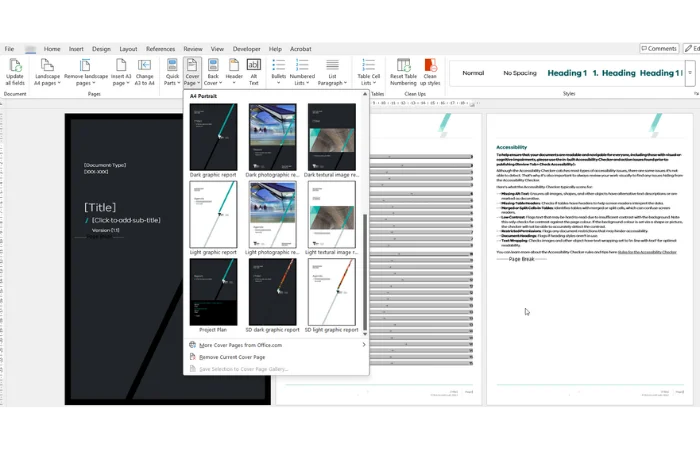
A custom Formatting Control tab keeps a state transport department's documents on-brand for staff who are not Word experts.
See our custom Word ribbon and templatesYour Microsoft Technology Development and Consulting Experts - Operating since 2000



An add-in puts your own buttons, panels and automation inside the Microsoft apps your staff already use, so a repetitive job becomes one click on the ribbon.
Add-ins extend Office products and make new functionality available to all of your staff, documents and workbooks. They suit tasks you repeat across many files, and they can connect Office to the other systems your business runs on. Every project starts with business analysis, so we build what your people actually need.
Whichever Microsoft app your people work in, we can build an add-in for it. We choose the technology that suits the platform, your users and your IT environment, then build it, deploy it and support it.
Tell us which appCustom worksheet functions, ribbon tools and task panes that pull live data from your systems, plus bulk tools for cleaning, reconciling and reporting.
Power Query servicesClause libraries, brand and style enforcement, guided document assembly and tools that stop pasted content breaking your templates.
Custom Word ribbonsSlide and brand tools, deck builders that generate presentations from your data, and checks that run before a file is shared.
PowerPoint servicesSidebars that file email to the right client folder or CRM record, reply templates, signatures and smart sorting of busy inboxes.
AI email triageDesign tools, report generators and utilities that extend Access for the people who build and maintain your databases.
Database developmentTools that move plans, resources and progress between Project and your reporting or finance systems.
Shape and stencil tools, and add-ins that turn data into diagrams or read finished diagrams back into data.
Task pane add-ins that insert, read and organise notebook content from your other systems.
Layout and data tools for organisations that still run print and publication work through Publisher.
Publisher servicesBring your tools and data into chats and channels, so teams can act on a record without leaving the conversation.
Microsoft 365 servicesCustom web parts and extensions that give modern SharePoint sites and pages the behaviour your business needs.
SharePoint consultingCustom visuals for when the built-in charts do not show your data the way your business needs to see it.
Dashboard developmentCustom connectors that link Power Apps and Power Automate to your own systems, and code components that extend Power Apps.
Power Platform servicesCustom agents and extensions that connect Microsoft 365 Copilot or your own AI tools to your data and systems.
Copilot servicesThere is more than one way to build an add-in. The best choice depends on where your staff work, which devices they use and how much you need to connect to Windows or to other systems. We recommend an approach after the analysis stage, not before it.
| Approach | Runs in | Best for | Keep in mind |
|---|---|---|---|
| Office web add-ins (Office.js) | Office on Windows, Mac and the web. Support varies by app, and covers Excel, Word, PowerPoint, Outlook, OneNote and Project. | Teams on mixed devices, central deployment, and organisations moving to the new Outlook. | Runs in a sandbox, so some deep Windows integration is not possible. |
| VSTO add-ins (.NET) | Desktop Office on Windows. | Deep desktop integration, custom task panes, ribbons and Outlook form regions. | Windows only. Not supported in the new Outlook on Windows, though still supported in classic Outlook. |
| COM add-ins | Desktop Office on Windows. | Native performance, and apps such as Access and Publisher that VSTO does not cover. | Installed on each PC, and Windows only. |
| VBA add-ins (.xlam, .dotm and templates) | Desktop Office. | Quick, low-cost tools for a single team, often built from macros you already have. | Harder to secure and update across a large organisation, and macro security settings apply. |
| Excel custom functions and XLL | Custom functions in Excel on Windows, Mac and the web. XLL files in Excel on Windows. | New worksheet functions your formulas can call, and heavy calculations that need speed. | XLL add-ins are for desktop Excel on Windows only. |
| Teams, SharePoint and Power BI extensions | Microsoft 365 and the cloud, through the browser or the app. | Putting your tools where teams already collaborate, share files and report. | Built with web technology and deployed through Microsoft 365, not installed on each PC. |
Not sure which fits? Our consultants map how your people work first, then recommend one approach in writing. If the add-in needs to read from or write to other software, see our 3rd party app integration and Microsoft 365 API integration services. Microsoft changes add-in support from time to time, so we check current Microsoft documentation before every build.
An add-in sits between your business systems and the Microsoft apps your staff use all day. These are the jobs we are asked to automate most often.
Pull current figures from your accounting package, CRM or database into a workbook with one click, instead of exporting and pasting.
Insert approved clauses, brand blocks and slide layouts, and strip out formatting that does not belong.
A sidebar that files messages to the right client folder or CRM record, applies reply templates and flags what needs an answer.
Validate a document, workbook or email against your rules before it leaves: missing fields, wrong formats, confidential wording.
An add-in can send content to an AI model, or to one of our custom AI agents, and show the result inside Word, Excel or Outlook. People can summarise, draft, extract or sort content without switching tools. The agent can run inside your Microsoft tenant if your data rules require it, but it does not have to. We also help teams get more from Microsoft Copilot alongside a custom add-in.
Many businesses rely on an add-in that was written years ago, often by someone who has since moved on. It works until Office updates, a new PC arrives or IT moves to the new Outlook.
We can review an existing add-in, repair it, or rebuild it on a platform Microsoft still supports. Where the source code is missing, we document what the add-in does first, so nothing your team depends on is lost along the way.
We map how your people work today, what data is involved and which Microsoft apps and versions are in use. This decides whether an add-in is the right answer at all.
We recommend the technology, such as an Office web add-in, a VSTO add-in or a Teams app, and agree the scope with you in writing.
Small releases you can try early, tested on the Office versions and devices your team really uses.
We roll the add-in out the way your IT team prefers: centrally through the Microsoft 365 admin centre for web add-ins, or with an installer for desktop add-ins.
Office changes through the year. We document the add-in, train your team and can look after it as Microsoft apps update.
2500+ Happy Clients
Read all case studiesA custom Formatting Control tab keeps a state transport department's documents on-brand for staff who are not Word experts.
See our custom Word ribbon and templates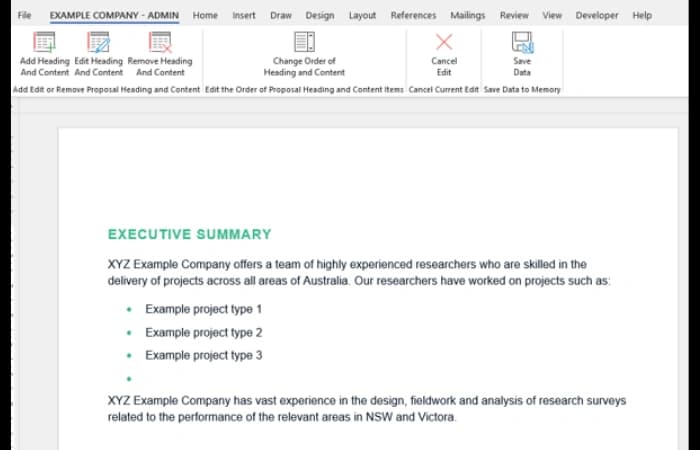
Staff start each financial planning report from a guided form, with the right headings and formatting applied automatically.
See our Word document builder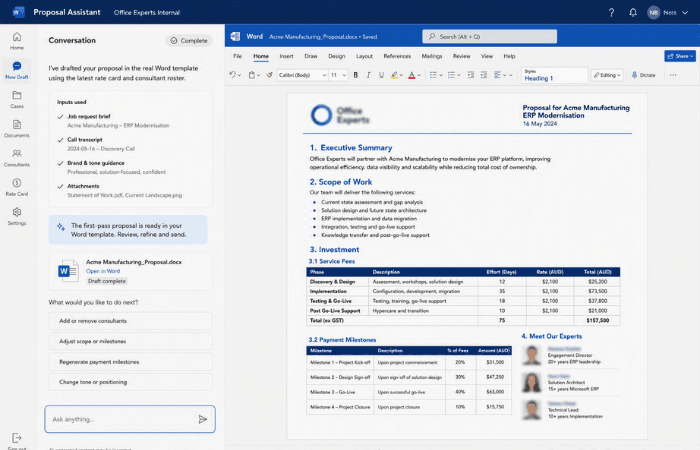
A conversational assistant turns call notes and a live rate card into a first-pass proposal in the real Word template.
See how our AI proposal assistant worksAn add-in is a small program that adds features to a Microsoft app, such as a ribbon button, a side panel or a new Excel function. It is installed once and then works in every document, workbook or mailbox that person opens.
We build add-ins for Excel, Word, PowerPoint, Outlook, Access, Project, Visio, OneNote and Publisher. We also build extensions for Microsoft Teams, SharePoint, Power BI and the Power Platform, and custom agents that connect to Microsoft 365 Copilot.
VSTO add-ins are .NET programs that run only in desktop Office on Windows. Office web add-ins are built with HTML, CSS and JavaScript and run across Windows, Mac and the web, although support varies by app. We recommend one after learning which devices, apps and versions your staff use.
Yes. Classic Outlook on Windows supports COM and VSTO add-ins, but the new Outlook on Windows needs web add-ins. We build for whichever version your organisation uses, and we can move an older Outlook add-in across to a web add-in.
Yes. We can review an existing add-in, repair it, update it for newer versions of Office or rebuild it on a supported platform. If the source code has been lost, we document what the add-in does first, so nothing your team relies on is missed.
Web add-ins can be deployed centrally by your Microsoft 365 administrator, so they appear for the right people automatically. Desktop add-ins use an installer that your IT team can push out. We agree the approach with your IT team before we build.
Yes. An add-in can send content to an AI model or to one of our custom agents and show the result inside the app, for example to summarise a document or sort an inbox. We check where your data goes and what your policies allow before we build anything.
It depends on the platform, the amount of integration and how many people will use it. We give you a written quote after a free initial consultation, once we understand what the add-in needs to do.
Copyright © 2024. Brayalei Pty Ltd T/As Office Experts Group. ABN 32 093 067 737. ACN 093 067 737. All Rights Reserved.