Your Microsoft Technology Development and Consulting Experts - Operating since 2000

Australia WideSydney, NSWMelbourne, VicBrisbane, QldPerth, WAAdelaide, SACanberra, ACTNorthern Rivers, NSWWollongong, NSWRichmond, VicDarwin, NT
Your Microsoft Technology Development and Consulting Experts - Operating since 2000


Following a major brand refresh, a state government transport department needed its entire Microsoft Office environment modernised, with staff across large, collaborative documents regularly hitting formatting corruption, inconsistent branding and accessibility gaps. We redesigned 17 enterprise Word templates, built a custom Word Formatting Control Tab to enforce approved styles automatically, and delivered a new PowerPoint master framework with 10 additional precinct-specific themes.
The challenge
Following a major brand refresh, the client needed its Microsoft Office environment brought into line across the whole organisation, spanning everything from reports and briefing papers to presentations used across multiple precincts.
Staff regularly worked across large, collaborative documents, and formatting corruption was an ongoing problem. Content pasted in from other sources would carry its own formatting with it, quietly breaking the corporate styles the templates were built around.
Branding consistency and accessibility compliance were difficult to maintain at scale without a way to enforce them automatically, and much of this fell to staff who weren't expected to have advanced Word or PowerPoint knowledge, but still needed to produce professional, on-brand documents day to day.
Without a controlled authoring environment, every new document carried a risk of drifting from the brand, breaking formatting, or falling short of accessibility standards, with no consistent way to catch or fix it.
Our approach
We redesigned the client's full enterprise Word template suite to the new brand, covering reports, briefing papers, project plans, agendas, minutes, factsheets and letterheads, so every document type shared the same visual foundation.
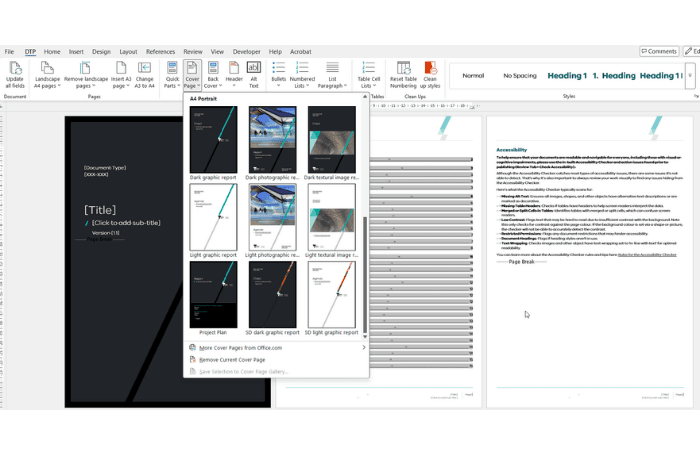
We developed a custom ribbon tab that lets staff create professionally branded documents directly from Word, automatically enforcing approved styles, tables and numbering without requiring advanced Word knowledge from the person using it.
We built controlled copy-and-paste functionality that prevents external formatting from corrupting the corporate templates and styles, and added a Styles Clean Up tool so any formatting that did get corrupted could be restored in a click rather than manually untangled.
We built automated table formatting and numbering controls, along with a document assembly system offering 17 report cover designs across portrait and landscape, 9 branded back cover designs, and 9 header variations, with covers, headers and section pages inserted automatically.
We redesigned the client's PowerPoint presentation framework with expanded slide layouts, icon libraries, accessibility guidance and improved data visualisation, then built 10 additional precinct-specific themes so individual precincts could maintain their own identity while staying aligned to the broader organisational brand.
We implemented digital signing and supported the enterprise deployment of the new templates and tools, so the rollout reached staff across the organisation in a controlled, supported way.
The outcome
The client now has consistent branding across both Word and PowerPoint, with the custom ribbon enforcing approved styles, tables, numbering and branding automatically rather than relying on individual staff getting it right manually.
Formatting errors caused by copy-and-paste operations have been significantly reduced, and when formatting issues do occur, the Styles Clean Up tool restores them in a click, keeping document creation simple for non-technical users across a consistent experience spanning every document type.
Accessibility compliance has improved across the template suite, and the organisation now has a scalable, long-term maintainable framework that supports future needs, including the ability for individual precincts to keep their own branding without breaking the broader corporate identity, all while reducing the ongoing support and training burden on the wider team.
Copyright © 2024. Brayalei Pty Ltd T/As Office Experts Group. ABN 32 093 067 737. ACN 093 067 737. All Rights Reserved.
 consult@officeexperts.com.au
 1300 102 810