Your Microsoft Technology Development and Consulting Experts - Operating since 2000

Australia WideSydney, NSWMelbourne, VicBrisbane, QldPerth, WAAdelaide, SACanberra, ACTNorthern Rivers, NSWWollongong, NSWRichmond, VicDarwin, NT
Your Microsoft Technology Development and Consulting Experts - Operating since 2000


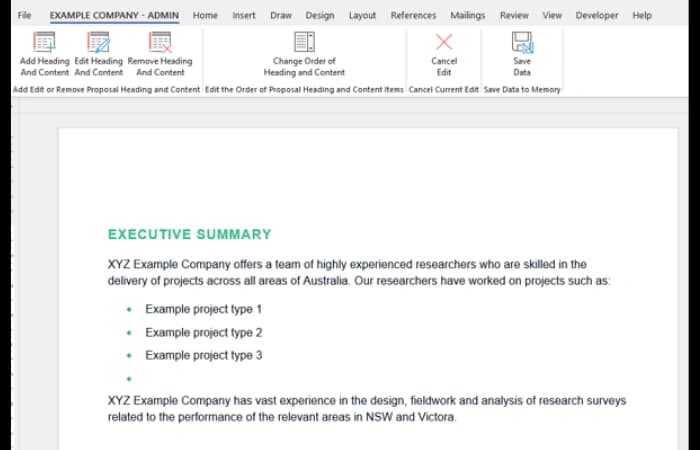
The client's reports combined free text with a large library of pre-existing headings and content, arranged in three tiers from Heading 1 to Heading 3. Staff needed to start each report with only the summary blocks relevant to that client, then add their own custom headings where required, with the right format applied automatically. We built a Word document builder with a pop-up form for choosing items, automatic parent headings, custom Heading 3 items, and a background library the Administrator maintains and rolls out to every staff template.
The challenge
The client worked in financial planning and created reports in Word by combining free text with pre-existing headings and content. There was a large number of these ready-made data blocks to choose from, arranged in three tiers: Heading 1, Heading 2 and Heading 3 items.
Listing every single heading and content item in the starting document was not practical. The client needed to begin a new report by picking only the summary blocks relevant to that report, and then add their own customised headings and content at the bottom level where required.
Formatting added to the challenge. Each of the three heading tiers needed its own unique format, and every time a user added a custom heading, its format needed to update automatically.
The library of headings and content was also going to change over time. The client needed the Administrator to be able to access it and add, edit and remove items as required, without having to rebuild the documents staff worked from.
Our approach
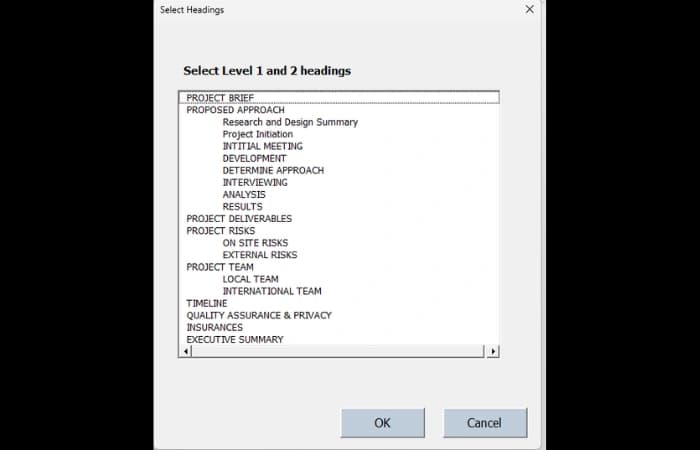
Each time a staff member creates a new report, a pop-up form appears showing all of the main heading items. The user picks only the ones they need, and only those are brought into the document.
The headings and content items that users can choose from are held in a background library, rather than being listed in full in every document.
When a user selects an item from a lower tier, such as Heading 2 or Heading 3, the parent summary items above it in the hierarchy are added to the document automatically as well.
Once the initial document has been created, users can add their own new Heading 3 item anywhere in the document, and the heading format updates automatically so it matches the rest of the report.
Users can bring the pop-up form back at any point to see the entire list of Heading 1 and Heading 2 items, and add any of them in the location they choose in the document.
A background document gives the Administrator access to the library, so they can add, edit and remove Heading 1, 2 or 3 level items as required.
Once changes have been made to the library, they are rolled out to the template used by all of the staff members who need it.
The outcome
Staff now build each report by picking only the summary blocks they need from a pop-up form, rather than working from a document that lists every heading and content item.
Selecting a lower-tier item brings in its parent items automatically, and users can add custom Heading 3 items or further Heading 1 and Heading 2 items anywhere in the document, with each tier keeping its own format.
The Administrator can add, edit and remove Heading 1, 2 and 3 level items in the background library as the content changes over time, and roll the changes out to the template used by all required staff.
Copyright © 2024. Brayalei Pty Ltd T/As Office Experts Group. ABN 32 093 067 737. ACN 093 067 737. All Rights Reserved.
 consult@officeexperts.com.au
 1300 102 810