Your Microsoft apps already hold the data. We get them talking.
Most organisations run on Word, Excel, Outlook, Teams and SharePoint, with a Power App or an Access database somewhere in the mix. Each one does its job, but information gets retyped every time it moves between them. API integration connects them directly, so a figure entered once flows into the spreadsheet, the report, the email and the dashboard without anyone copying it across.
Office Experts Group has built Microsoft solutions for Australian businesses since 2000. This page brings our Word, Excel, Power Platform and Access integration work together in one place, and sets out what the Microsoft APIs can realistically do in 2026, including the newer AI agent and Model Context Protocol (MCP) options.
Office JavaScript API
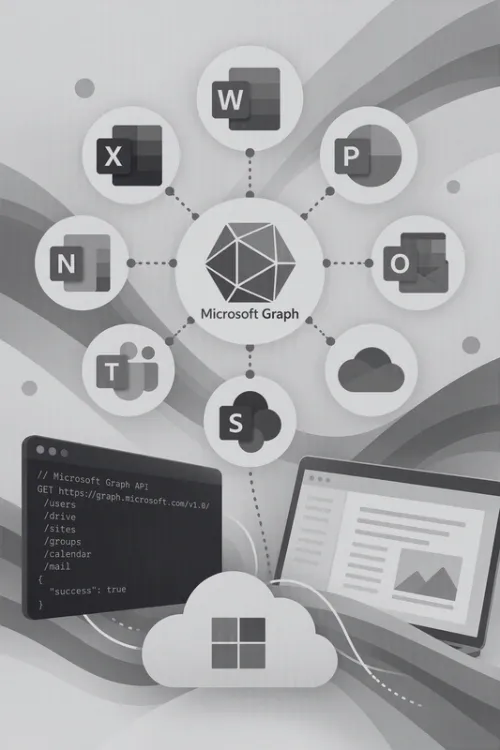
Microsoft Graph
Dataverse Web API
Power BI REST API
Microsoft 365 Copilot APIs
MCP servers
SQL Server & ODBC
By application
What each Microsoft app can do once it’s connected.
Every Office application exposes a different set of APIs. These are the integrations we build most often for each one, and what is realistic with the tools Microsoft offers today.
Documents
Microsoft Word
Word add-ins built on the Office JavaScript API read and write content controls, tables, headers and tracked changes, so proposals, contracts and reports assemble themselves from your CRM, database or a guided form. On the server side, Microsoft Graph creates, stores and converts Word files to PDF in SharePoint and OneDrive without anyone opening Word.
Excel's calculation engine is available through the Microsoft Graph REST API, so a web app or mobile form can write rows into a workbook table, run Excel's worksheet functions and read the answer back. Inside Excel, Office.js add-ins and custom functions bring outside data into the grid and replace VBA that won't run on the web or Mac.
Read and write tables, ranges and charts in .xlsx files
Use a workbook as a calculation service for other apps
Custom functions and task panes that pull live data
Email and chat are where most requests arrive. Web-based Outlook add-ins run in the new Outlook for Windows, on the web and on Mac, which matters because new Outlook no longer loads the old COM add-ins. Graph lets your systems send mail, file attachments, book meetings and post Teams messages, and change notifications tell your app the moment something arrives.
Outlook add-ins that work in new and classic Outlook
PowerPoint add-ins insert approved slides from a library, apply the right layouts and keep every deck on brand. Server-side scripts go further and build whole decks from Power BI or database figures, so monthly reporting packs are generated rather than pasted together slide by slide.
SharePoint is the document store behind most of these integrations. Through Graph we create sites and folders, apply metadata, move files between libraries and keep lists in sync with outside systems, always respecting the access each person already has.
Automatic site and folder set-up for new jobs
Metadata, lists and permissions managed from your apps
Dataverse has a full Web API, and Power Automate's library of more than 1,400 connectors (plus custom connectors where none exist) links Microsoft 365 to most business systems. Power BI's REST API, including the ExecuteQueries endpoint, lets another app or a flow query a published semantic model directly, so reports, emails and decks all quote the same numbers.
Access has no cloud API of its own, so integration starts with where the data lives. We move tables to SQL Server or Azure SQL and keep the Access forms your team knows, link to Dataverse when Power Apps need the same records, and add VBA that calls REST APIs directly. Once the data is on a server, web portals, Power BI and Power Automate can all reach it.
Microsoft 365 is rarely the only system a business runs. Connecting Word, Excel and Outlook to accounting packages, CRMs, payroll and industry software is a separate piece of work, with its own authentication, data mapping and error handling, so it has a dedicated page rather than a short section here.
The newest integration layer: agents that act inside Microsoft 365.
Until recently, an integration was code that followed fixed rules. The same Microsoft 365 data can now also be reached by AI agents, which read a request in plain English and choose which tool to call. Microsoft has standardised much of this on the Model Context Protocol (MCP), an open way for agents to discover and use tools, with permissions and audit applied in the middle.
We build agents in Copilot Studio when your licensing and governance are already in place, and fully custom agents in Python or JavaScript when they don’t need to live inside your tenant. Either way, the agent only gets the access it needs for one job.
Generally available
Microsoft-hosted MCP servers
Agent 365 tooling servers give an agent governed access to Outlook mail and calendar, SharePoint and OneDrive and Copilot Search, acting on behalf of the signed-in user. IT manages them from the Microsoft 365 admin centre. They need Agent 365 and Microsoft 365 Copilot licensing.
Generally available
Dataverse and custom MCP servers
Dataverse has its own MCP server that respects your security roles, and Power Platform can now publish custom MCP servers assembled from existing connector actions, with data loss prevention applied per tool. Copilot Studio or another agent can then work with your records without a direct database connection.
Licence dependent
Copilot Retrieval API
Grounds your own app or agent in SharePoint, OneDrive and Copilot connector content, returning permission-trimmed text, so people only get answers drawn from documents they could already open. It's included with Copilot licences, with pay-as-you-go access in preview for other users.
Preview
Copilot agents inside Office add-ins
The unified manifest now packages an Office add-in, a Teams app and a Copilot agent together. Microsoft is previewing agents that call an add-in's own functions, so a request like “fill this proposal from the CRM” can run the same code your add-in button does.
Integrations that meet people where they already work.
Inside Word, Excel, PowerPoint and Outlook
Task panes, ribbon buttons and custom functions that sit in the apps your team already has open, deployed centrally from the Microsoft 365 admin centre. The unified manifest can switch off an older COM or VSTO add-in once its web replacement is installed, which makes retiring legacy add-ins far cleaner.
Responsive Next.js and React portals that sign people in with Entra ID and surface SharePoint, Excel and Dataverse data on one screen, instead of five apps and five logins.
React Native apps and installable Progressive Web Apps let field teams fill in forms, take photos and read site documents with no signal, then sync to SharePoint or Dataverse when they're back in range. No app store needed for a PWA.
Tabs, bots and adaptive-card approvals that bring a decision to the person in the channel where they're already working, rather than sending them to another system to click approve.
Azure Functions, Power Automate flows and scheduled jobs that move and reconcile data overnight with no screen at all. Often the most valuable integration is the one nobody sees.
The best first project is usually the task someone does by hand every day. These are the ones we’re asked about most.
Legal and professional services
Contracts and letters of advice assembled in Word with the right clauses already filled from the matter record, using pop-up forms or the practice management system as the source.
Office.js · Graph · SQL
HR and people teams
Offer letters, contracts and onboarding packs generated from employee records, with leave and onboarding requests approved in Teams and filed to SharePoint automatically.
Graph · Power Automate · Teams
Finance and reporting
Excel models fed by live data instead of exports, and Power BI figures flowing straight into board papers and dashboards, so every report quotes the same number.
Excel REST API · Power BI REST
Sales and business development
Proposals and quotes drafted in the real Word template from CRM data and a current rate card, then emailed and logged without leaving Outlook.
Office.js · Graph · Dataverse
Construction and field services
Site reports, safety checklists and photos captured offline on a phone, synced to the right SharePoint job folder, which was itself created automatically when the job was won.
React Native · PWA · SharePoint
Health and community services
Patient and client forms chased automatically from the data warehouse, with role-based access through Entra ID so staff only see the records they're meant to.
Power Automate · Fabric · Entra ID
How we work
Five steps from idea to a working integration.
01
Understand the process
We map how the work happens today, who touches the data and where it gets retyped. Our business analysis often finds the integration that saves the most time isn’t the one first asked for.
02
Choose the right API
Sometimes a Power Automate flow beats custom code, and sometimes the reverse. We also check licensing up front, since Copilot, Power Platform premium connectors and Power BI APIs each carry their own requirements.
03
Design the security
An Entra ID app registration with the fewest permissions the job needs, delegated access where a person is involved, and logging so you can see what the integration did and when.
04
Build and test on real data
We build against copies of your actual documents, workbooks and records, including the awkward edge cases, rather than a tidy demo file.
05
Deploy and support
Add-ins and agents are deployed centrally from the Microsoft 365 admin centre, documented and handed over, with ongoing support from the same team that built them.
2000Building Microsoft solutions since
25+Microsoft specialists Australia-wide
5Languages: JavaScript, .NET, Python, VBA, SQL
Programmers, designers and solution architects who work across the whole Microsoft suite, so an integration is treated as part of the tools you already rely on, not a bolt-on nobody can maintain.
Case studies
Some of the Microsoft integrations we've built
Real projects where Word, Excel, Power Platform, Access and AI were connected to remove manual work.
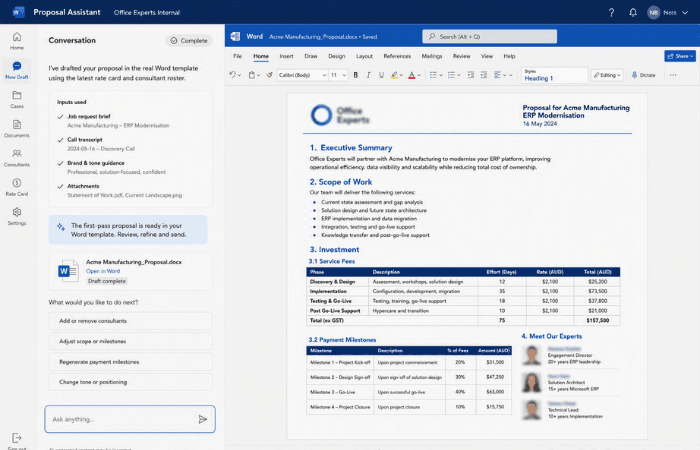
Turning call notes and a rate card into a first-pass proposal inside the real Word template
Reps drafted proposals by hand from call notes and copy-pasted fee figures. We built a conversational AI assistant that drafts a first-pass proposal in the real Word template, using a live rate card.
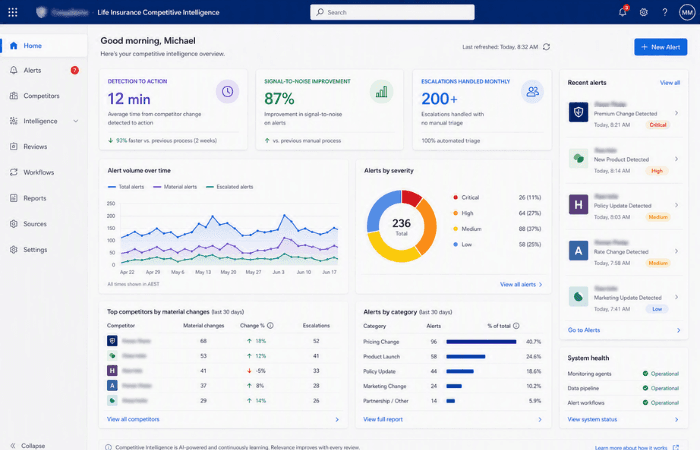
Cutting competitor response time from two weeks to twelve minutes
A bank's life insurance division was consistently late to competitor moves. We built an AI-driven system on its own Microsoft 365 tenancy that monitors competitors around the clock and routes prioritised alerts into Teams.
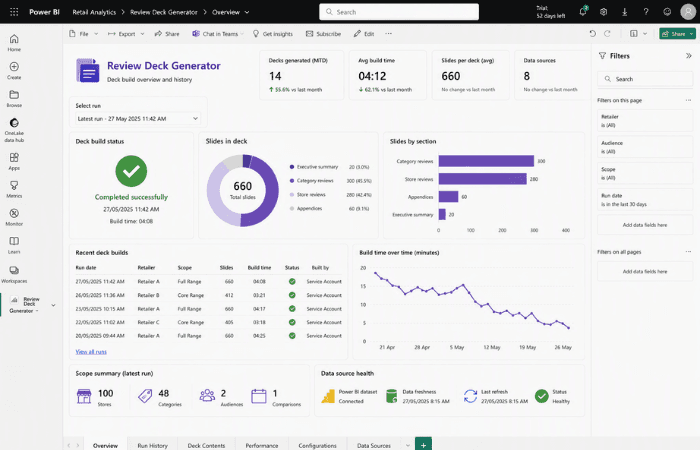
Turning a days-long PowerPoint build into a one-click, 600+ slide deck
Review decks were built by hand, slide by slide, from Power BI figures. We built a Python tool that queries Power BI and assembles a fully branded deck of around 660 slides in under five minutes.
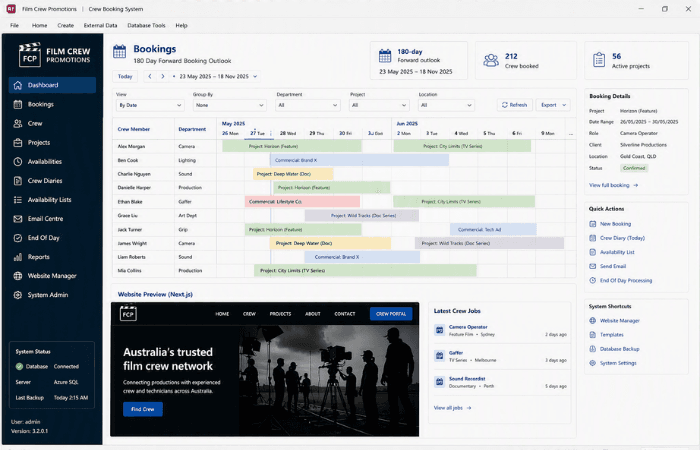
Migrating a VM-locked Access 2000 database to Azure with a 10x faster Next.js website
A crew booking operation ran on an Access 2000 database that only worked on a VM. We rebuilt it on Azure SQL Server and rewrote the website in Next.js, giving a site that loads 10x faster.
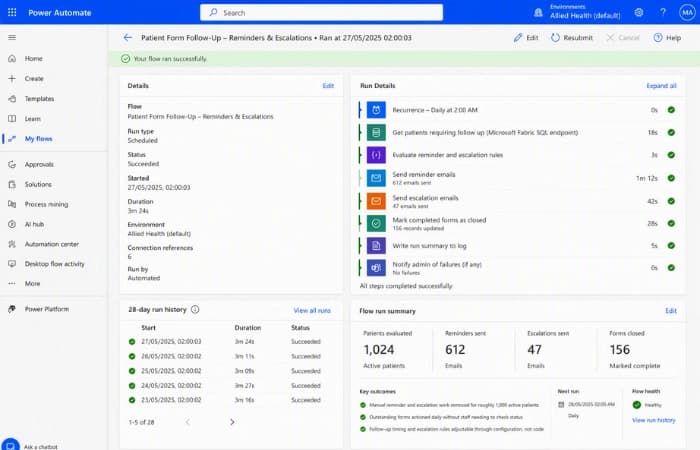
Removing manual form chasing for around 1,000 active patients
Tracking which patients had returned their forms was done entirely by hand. We built two scheduled Power Automate flows on a Microsoft Fabric data warehouse that send reminders, escalate overdue cases and close off completed forms.
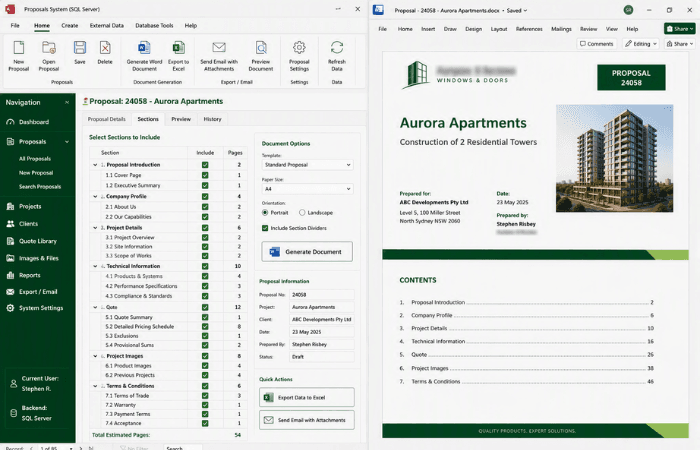
Replacing 50-page proposals built by hand with a database-driven document generator
Proposals, quotes and contracts of 50 or more pages were pieced together by hand from paper and Excel. We designed an Access database, later migrated to SQL Server, that generates the full Word document automatically.
Still unsure which approach suits you? Our general FAQ covers how we work, or ask us directly below.
What is Microsoft 365 API integration?
It's connecting Word, Excel, Outlook, Teams, SharePoint, Power Platform and your databases through their programming interfaces, so data moves between them automatically. Instead of copying figures from an email into a spreadsheet and then into a report, the systems pass the data along themselves.
Which Microsoft APIs do you work with?
The Office JavaScript API (Office.js) for add-ins inside Word, Excel, PowerPoint and Outlook; Microsoft Graph for mail, calendars, files, Teams and Excel workbooks; the Dataverse Web API and connectors for Power Platform; the Power BI REST API; the Microsoft 365 Copilot APIs; MCP servers for AI agents; and SQL Server or ODBC for Access and other databases.
Can you replace our old VBA, COM or VSTO add-ins?
Usually, yes. Office.js add-ins run on Windows, Mac and the web, while COM and VSTO add-ins only run in desktop Office on Windows, and the new Outlook for Windows doesn't load COM add-ins at all. The unified manifest can also switch off the old add-in automatically once its replacement is installed. VBA still has a place in desktop-only workbooks, so we assess each one rather than rewriting everything.
Do we need Microsoft 365 Copilot licences?
Only for some integrations. Office.js add-ins, Microsoft Graph, Dataverse and SQL Server integrations work with standard Microsoft 365 and Power Platform licensing. The Copilot Retrieval API and Microsoft's Agent 365 MCP servers do need Copilot licensing, and Power BI's API needs at least a Pro licence. We check this before any build starts.
Is our data secure when systems are connected?
Every integration signs in through Microsoft Entra ID with only the permissions it needs. Where a person is involved, it acts with that person's own access, so it can't see anything they couldn't. Data stays inside your Microsoft 365 tenant unless an integration is specifically designed to send it elsewhere, and activity can be logged and audited.
Can a web or mobile app use our Excel workbooks?
Yes. Microsoft Graph can read and write tables, ranges and charts in .xlsx workbooks stored in OneDrive or SharePoint, and can run Excel's worksheet functions remotely. Older .xls files aren't supported. If many people will be writing at once, moving the data into a database such as SQL Server or Dataverse is usually more reliable.
Can our Access database connect to Microsoft 365?
Yes, though Access itself has no cloud API. The usual path is moving the tables to SQL Server or Azure SQL while keeping the Access forms, or linking to Dataverse so Power Apps can use the same records. Once the data is on a server, Power BI, Power Automate and web portals can all connect to it.
Do you integrate Microsoft 365 with Xero, MYOB or Salesforce?
Yes. Connections to non-Microsoft products such as Xero, MYOB and Salesforce are covered on our 3rd party app integration page.
Contact Us
Get in touch with our team for general enquiries and support. We're here to help with any questions you might have about our services.
Need to attach a file?
Need pricing for a specific project? Fill out our quote form and we'll provide you with a detailed estimate tailored to your needs.

 consult@officeexperts.com.au
 1300 102 810