Your Microsoft Technology Development and Consulting Experts - Operating since 2000

Australia WideSydney, NSWMelbourne, VicBrisbane, QldPerth, WAAdelaide, SACanberra, ACTNorthern Rivers, NSWWollongong, NSWRichmond, VicDarwin, NT
Your Microsoft Technology Development and Consulting Experts - Operating since 2000




Most businesses run on a mix of products: an accounting package, a CRM, a database and the Microsoft Office tools staff actually use all day. When those systems don't talk to each other, people fill the gaps by copying, pasting and re-keying.
We build the connections. Our Australian developers link Excel, Word, Access, PowerPoint and Microsoft 365 to the products you already pay for, so the right data is in the right place without anyone handling it twice.
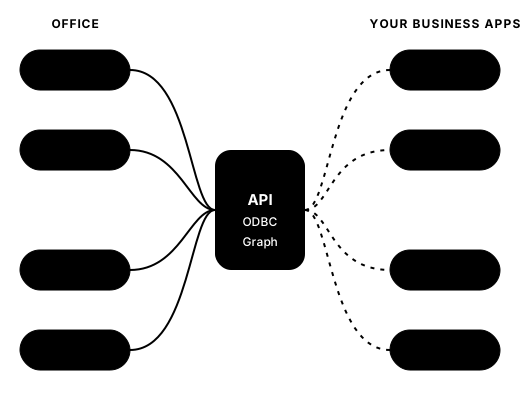
Platforms we integrate
If your product is API or ODBC enabled, we can read from it, write to it, or both. Here are the platforms we are asked about most often.
Pull invoices, bills, bank transactions and reports from Xero into Excel for budgets, cashflow and board packs, or post validated invoices and journals back into Xero.
Xero to Power BIConnect MYOB to Excel, Word or Access through its API or ODBC, depending on your MYOB product. Automate job costing, supplier reports and month-end packs.
How we use ODBC and SQLExtract Pronto ERP data for reporting in Excel and Power BI, and load clean data back in, without relying on manual exports.
Power BI data integrationSync leads, accounts and opportunities with Excel, generate quotes and proposals in Word straight from a Salesforce record, and keep pipeline reports current.
Word API integrationsLink Dynamics data to Office and Microsoft 365 so sales, service and finance teams work from the same figures.
Microsoft 365 API integrationMove contacts and deals between Zoho and Excel or Outlook, and automate the follow-up documents your team writes by hand today.
Bring audience and campaign results into Excel for reporting, and send clean, validated contact lists back to Mailchimp.
Connect Office to SQL Server or Azure SQL for live reporting and data entry, with Access as a front end when it suits.
SQL Server and Access integrationIf your product has an API, an ODBC driver or a database we can reach, we can usually link it to Office or build a custom app around it.
Custom app developmentWe choose the method that suits your product, your security requirements and how your team works. Often a solution uses more than one.
The modern standard for Xero, Salesforce, MYOB and most cloud products. Changes in one system can trigger updates in another as they happen.
Custom app developmentA dependable option for SQL Server, MySQL, Oracle and older desktop products that expose their data through a driver.
Office and SQL Server integrationOne connection to Teams, SharePoint, OneDrive and Outlook, so business data can sync with Microsoft 365 in real time.
Microsoft 365 API integrationCloud-based task panes and ribbon buttons that work across Windows, Mac, web and mobile. They are also the way forward for Outlook, as VBA isn't supported in the new Outlook.
Add-in creationLow-code flows that move data between your apps and Microsoft 365 on a schedule or when something happens, using your existing licences where possible.
Power Automate servicesStill the fastest route for many Excel, Word and Access desktop tasks, including calling a web API from inside a workbook.
VBA macro developmentChoosing a method
A quick guide to how the six methods compare. We confirm the right one before any building starts, and many projects combine two.
| Method | Best for | Watch for | Security approach |
|---|---|---|---|
| REST APIs and webhooks | Cloud products such as Xero, Salesforce and most modern software. Suits changes that need to flow between systems as they happen. | Rate limits, API version changes and expired sign-in tokens. Each has to be handled so a sync doesn't quietly stop. | Usually OAuth 2.0 sign-in, with only the permissions the job needs, on a dedicated connection that can be revoked. |
| ODBC and direct database links | SQL Server, MySQL, Oracle and older desktop products that expose data through a driver. Good for reporting and data entry from Excel or Access. | The driver must be installed on each computer, and the 32-bit or 64-bit versions of Office and the driver have to match. The database must also be reachable on your network. | A dedicated database account, read-only where possible, so permissions are controlled in the database itself. |
| Microsoft Graph API | Teams, SharePoint, OneDrive and Outlook data, and automation inside Microsoft 365. | Permissions often need administrator consent, and Microsoft throttles very heavy request volumes. | An app registration in Entra ID, using delegated permissions (acting as the signed-in person) or application permissions (acting as the app) as appropriate. |
| Office.js add-ins | Task panes and ribbon buttons that work across Windows, Mac, web and mobile, including the new Outlook. | The add-in's web app needs hosting, and some deep desktop features are easier to build in VBA. | Can be deployed centrally by your IT team through the Microsoft 365 admin centre, with sign-in handled by Entra ID where needed. |
| Power Automate and connectors | Flows triggered by an event or a schedule, such as a new email, a new record or a daily check. | Some connectors need premium licences, and flows have run and throttling limits at high volumes. | Connection credentials are managed in the platform, and data loss prevention policies can limit which apps are allowed to connect. |
| VBA macros | Excel, Word and Access desktop tasks, including calling a web API from inside a workbook. | Desktop only. VBA doesn't run in Office for the web or the new Outlook, and has some differences on Mac. | Macro security settings and digitally signed code, so only trusted macros are allowed to run. |
Not sure which applies to your product? Our business analysis works that out before any code is written.
Worked example
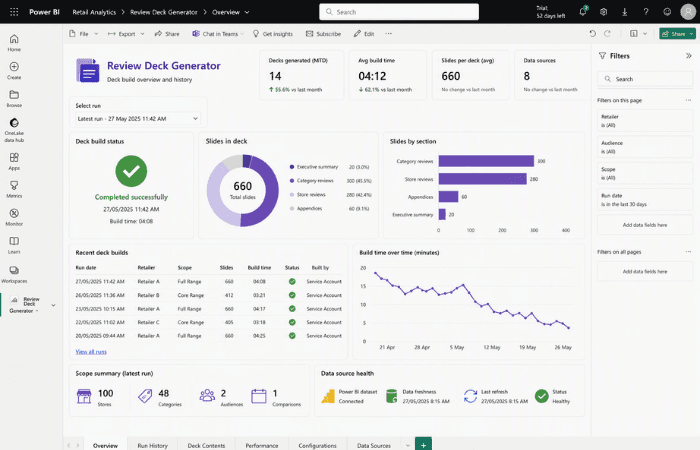
One project from our case studies, in the order it happened. The data source here is Power BI, but the pattern is the one we use for Xero, MYOB and Salesforce: read live data through a supported connection, then build the Office document from it.
Before
The process was entirely manual. The analyst pulled the figures out of Power BI by hand, dropped them into slide templates one by one, refreshed everything, then tidied the file so it wouldn't break, and repeated the whole exercise for every part of the range.
What we built
We reviewed the analyst's current review decks in detail to capture exactly what each one needed to show, across the different audiences and parts of the range the business reported on.
We built a Python tool that reads a simple scope from a front sheet, queries the client's existing Power BI data directly, and assembles a complete PowerPoint deck automatically, then tested it against live data and refined it with the analyst's feedback.
We matched the output to the client's existing branding and put the tool into everyday use for a live retailer review, so the analyst was producing genuine, client-ready decks with it from day one.
After
The analyst now sets the scope in a simple front sheet, clicks once, and a fully branded deck of around 660 slides is built automatically, drawing straight from the client's live Power BI data so the numbers are always current.
Recent projects
Different products, the same approach: link the data source to the tools your team already uses, then test it on real records.
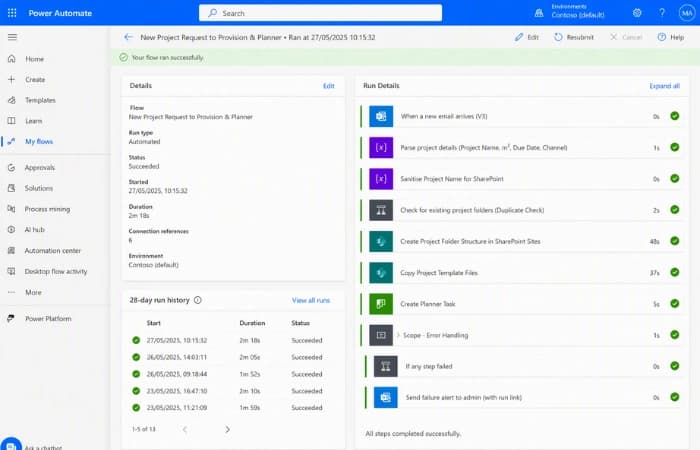
Manufacturing
How it connects: A Power Automate flow reads the project details from a notification email and builds the job folders across three SharePoint sites.
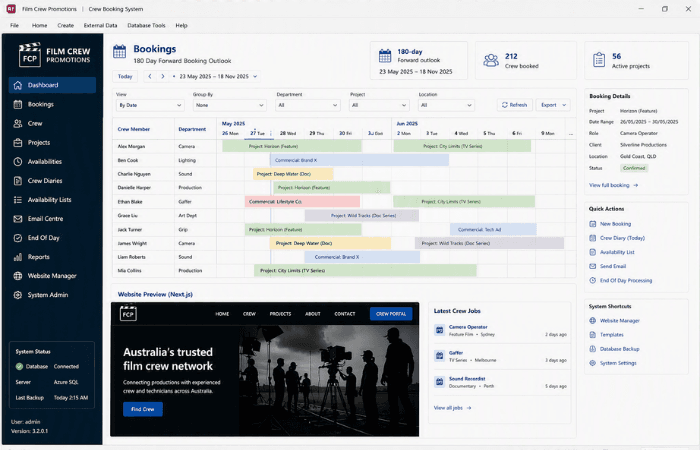
Media and Entertainment
How it connects: An Azure SQL Server back end shared by the Access system and a Next.js website through a direct database connection.
Healthcare
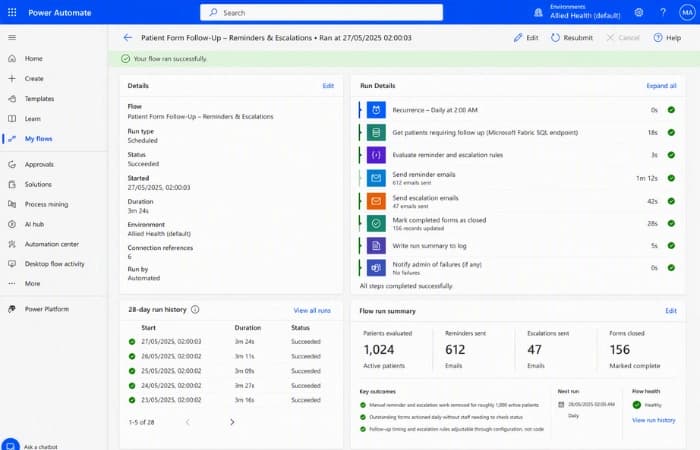
How it connects: Two scheduled Power Automate flows reading the client's Microsoft Fabric data warehouse. Streamlining patient follow-up and escalation.
AI and your business data
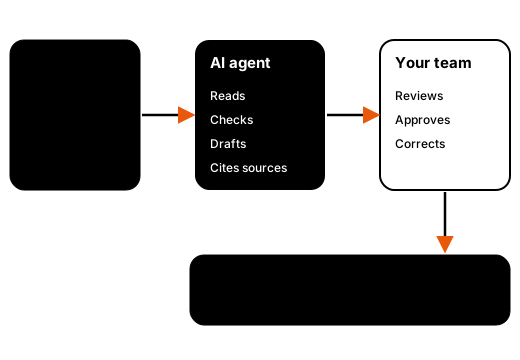
Your accounting package and CRM hold years of useful information. AI agents can read it, check it against your rules and prepare the result, so your team spends time approving work instead of assembling it.
We build agents inside Microsoft 365 and Azure, or as custom Python and JavaScript agents when the job needs more room. See our AI agent development service, or how Copilot for Microsoft 365 fits alongside them.
Turn Salesforce notes and activity into a one-page client brief in Word before every meeting.
Check Xero or MYOB transactions against your rules, flag anything unusual and leave the decision to your team.
Build proposals and reports inside your real Word template using current rates, prices and customer details.
See our proposal assistantRead shared inboxes, match emails to the right customer record and route or draft replies.
AI email triageSecurity and data handling
Connecting accounting and customer data to Office raises fair questions about who can see what. These are the principles we build to.
Where your IT team requires it, we build in your Microsoft 365 and Azure environment, so data stays in the region your tenant uses and access follows the same Entra ID sign-in as your other tools.
Migrating a tool inside AzureRead-only where reading is enough. Where we write back to Xero, MYOB or Salesforce, the connection uses a dedicated account or app registration with limited permissions, so it can be reviewed or switched off without affecting anyone's own login.
We test with real accounts and your real figures. On one project we confirmed with an external account that partners could never see each other's data, matching every figure to the cent.
Partner data isolation case studyFor important steps a person reviews the result before anything is posted or sent, and we can log who changed what and when, so there is a trail to check later.
Audit trail case studyHow we work
We map how data moves today, who touches it and where it goes wrong, as part of our business analysis.
Business analysisWe confirm what your product's API, ODBC driver or database allows, plus permissions, security and licensing.
We build the integration and test it on your actual records and edge cases, not tidy samples.
We train your team, document the solution and stay on hand as your software and processes change.
Common questions
Yes. Using the Xero API we can pull invoices, bills, contacts, bank transactions and reports into Excel so your budgets, cashflow forecasts and board reports update from live data instead of copied exports. We can also build the reverse: a validated Excel sheet that creates invoices or journals in Xero, with checks that stop bad data getting in.
In most cases, yes. Depending on your MYOB product and version, we connect through the MYOB API or through ODBC. That lets us bring customer, supplier, job and ledger data into Excel for reporting, into Word for document generation, or into Access when you need a more structured reporting database. We confirm the best connection method with you before quoting.
We use the Salesforce API to read and write leads, accounts, contacts and opportunities. Typical solutions include Excel pipeline reports that refresh on demand, Word quotes and proposals generated from an opportunity record, and Outlook or Teams actions that update Salesforce without anyone re-keying details.
Many older systems still offer an ODBC connection, a database we can read directly, or scheduled CSV and Excel exports. Where one of those exists we can usually automate it. Where none does, we will tell you plainly and suggest the next best option rather than building something fragile.
Yes. We build AI agents that read your business data, check it against your rules, and draft results such as summaries, reconciliations or proposals for a person to approve. They can run inside your Microsoft 365 or Azure tenant, or as custom Python and JavaScript agents. Before any code is written we agree which AI provider is used, where data is processed and what is retained.
Cost depends on how many systems are connected, how much data moves in each direction, and how much validation and review the process needs. A single read-only report from one system is a small project, while a two-way sync between several systems is larger. After a discovery conversation we provide a written scope and quote.
Vendors update their APIs from time to time, and we build integrations with that in mind, using supported endpoints and logging every call so problems are easy to trace. If a vendor change affects your solution, we can update it under a support arrangement.


Quote or
hourly rate

Ongoing
support

Remote access
or onsite

Tailored
training
Copyright © 2024. Brayalei Pty Ltd T/As Office Experts Group. ABN 32 093 067 737. ACN 093 067 737. All Rights Reserved.
 consult@officeexperts.com.au
 1300 102 810