Your Microsoft Technology Development and Consulting Experts - Operating since 2000

Location
Australia WideSydney, NSWMelbourne, VicBrisbane, QldPerth, WAAdelaide, SACanberra, ACTNorthern Rivers, NSWWollongong, NSWRichmond, VicDarwin, NT
emailconsult@officeexperts.com.au
Phone1300 102 810
Office experts logo
Contact Us
word document templates designword document templates design

Companies and Organisations

Company documents back under control

Our team of Word design experts deliver versatile templates that meet the needs of any company or organisation. Our experienced Word designers will ensure your corporate identity is protected and can cut your costs through setting you up to produce your own in-house reports.

Talk to our Word expertsWord template specialists since 2000

Template

The Solution You Need!

Office Experts Group have developed an advanced Corporate Word Template Solution to enable users to effectively and efficiently create corporate documents in house. These documents are created under a controlled environment, therefore only allowing formatting that is consistent to your branding guidelines.

  • Corporate master template
  • In-house sub templates
  • Brand controls built in

Brand protection

Streamlined and Secure Document Creation

Our custom template solutions give users access to pre-approved styles and colours based on your brand’s unique specifications. By limiting font and style changes, our controlled environment ensures that every document aligns with your corporate identity, preserving brand consistency while empowering users to work efficiently within set guidelines.

1300 122 038Call a template specialist
  • Approved styles and colours

    Users will have access to approved prebuilt styles and colour palette, based on your specifications.

  • Fonts stay locked

    Your brand will be secure as users will not have the ability to edit fonts or font sizes from the Home tab.

  • Controlled pasting

    Pasted text is inserted under a controlled environment which ensures only your corporate fonts are permitted.

  • Protected documents

    Your documents will no longer be ruined by external formatting corrupting your styles and functionality.

Leave it to us

No More Headaches!

We can help you put an end to messy documents that break corporate branding.

It rarely starts with carelessness. Staff paste in content from emails and old reports, adjust a font to make something fit, or build a table from scratch because it’s quicker than finding the right style. Each shortcut is small, but together they leave you with documents that look like they came from different companies, and headings that number themselves in unexpected ways.

A style guide that people have to remember won’t fix that. We build the rules into the template itself, as part of your Word brand templates, so the correct result is also the easiest one.

  • No more unauthorised formatting from user pasted content

    Text pasted from emails, websites and old documents brings its own fonts, sizes and colours with it. Our templates intercept the paste and apply your approved styles instead, so foreign formatting never makes it into the document.

  • No more user manipulated colours, fonts and font sizes

    We take the font and font size controls out of the Home tab and give people your approved styles and colour palette in their place. They can still format their work, but they can't step outside the brand.

  • No more unauthorised formatting being populated into the content and styles, disturbing headings and list numbering orders

    Stray formatting is the usual reason headings stop numbering correctly and lists restart halfway down a page. With clean, protected styles underneath, numbering stays in order, and multilevel or legal-style lists work with one click.

  • No more creating tables and graphs with incorrect colour themes

    New tables pick up your default table style, and the template carries your colour theme, so tables, charts and shapes look on-brand without anyone choosing colours by hand.

Your templates, your rules

We’ll Put You Back In Control!

With our master templates, users can create sub templates in house under our controlled template environment.

That means your team isn’t waiting on a developer every time a new report, letter or proposal format is needed. They start from the master, create the variation they need, and the controls, styles and colour palette come with it. We build them using Word’s own tools, including custom ribbons and Quick Parts, so there is nothing extra to install or learn.

  • Content from other documents is controlled

    When someone inserts or pastes content from another file, it arrives under the template’s rules rather than dragging its old formatting along.

  • Unknown formatting defaults to ‘Normal’

    Anything the template doesn’t recognise falls back to your ‘Normal’ style, instead of introducing a stray font, size or colour.

  • Tables get your table style

    Tables have the default table style applied for consistent branding, so headers, borders and shading match without any manual fiddling.

  • Pasted text finds the right styles

    Pasted text looks for default Word styles such as Headings and ‘Normal’, applying your correct styles to them and keeping the document’s structure intact.

Talk to our Word expertsTell us where your documents are going wrong today.
Case Studies

A few template projects delivered for companies and organisations

2500+ Happy Clients

Read all case studies
  • One shared Global Common template keeping four entities on-brand
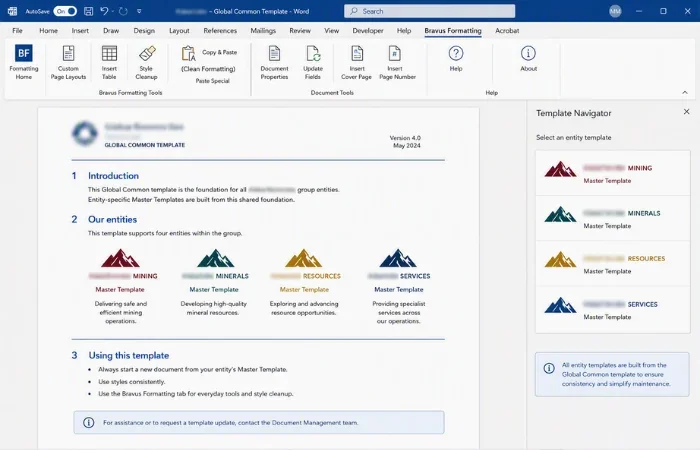
    Master Templates for four entities built from one Global Common template

    A corporate group needed consistent, professional templates across four related entities without four separate builds. We built a shared Global Common template, a custom Master Template for each entity on top of it, and a custom Formatting tab with a copy/paste macro that strips foreign formatting and applies approved styling automatically.

    View the copy/paste macro approach
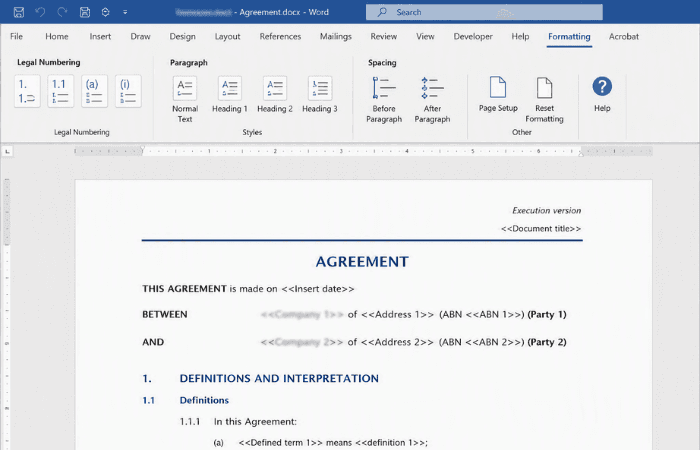
  • Locking a law firm's style guide into templates staff couldn't quietly override

    Word template suite and Formatting tab built around a legal firm's style guide

    Staff at a legal firm were editing documents to suit their own preferences rather than following the firm's style guide. We built a full document suite around the guide, built the firm's legal numbering lists into the templates, and added our custom Formatting tab for one-click access to them while locking down formatting controls.

    Explore the legal numbering lists
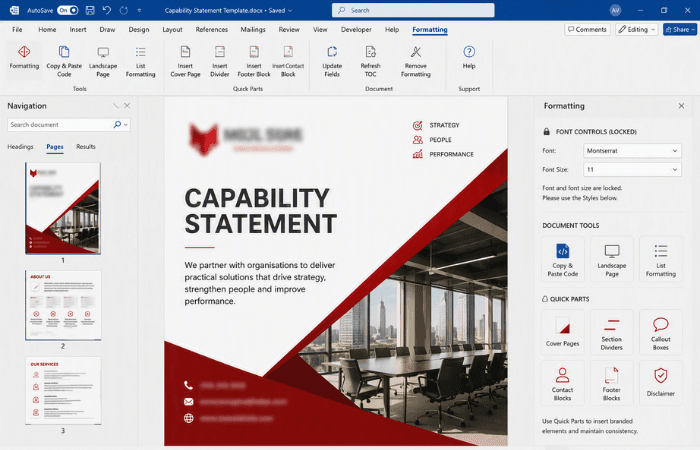
  • Rebuilding a full Word template suite to lock a new brand in, not just apply it

    Branded Word template suite built from a single Master Template

    While updating its branding, the client's Word templates kept breaking, with formatting corruption and staff freely overriding brand elements. We rebuilt the suite from a single Master Template with eleven sub-templates, added a custom Formatting tab that locks down font and font-size controls, and built branded Quick Parts for cover pages and other template elements.

    Learn more about our Formatting tab

Frequently Asked Questions

What is a corporate document template, and why is it important?

A corporate document template is a pre-designed format for creating branded documents within a company. It standardizes the layout, colors, fonts, and styles to ensure consistency with brand identity, saving time and reducing errors in formatting.

How does a controlled template environment benefit my organisation?

A controlled template environment restricts unauthorized changes to styles, fonts, and colors, ensuring that all documents adhere to brand guidelines. This protects your brand identity and reduces inconsistencies across corporate communications.

Can document templates help in reducing document creation time?

Yes, document templates provide pre-set formatting and design elements, allowing users to quickly create branded documents without having to start from scratch. This leads to significant time savings and increases productivity.

How can templates improve accessibility in corporate documents?

Templates can include accessible design elements such as readable fonts, high-contrast colors, and alternative text for images, making documents more accessible for all users, including those with disabilities. This helps organizations meet accessibility standards.

What should I consider when designing a document template for my brand?

When designing a document template, consider your brand’s colors, typography, logo placement, and layout guidelines. It’s also essential to ensure that all template elements align with your brand identity and meet your organization’s specific document needs.

Contact Us

Get in touch with our team for general enquiries and support. We're here to help with any questions you might have about our services.

Need to attach a file?

Need pricing for a specific project? Fill out our quote form and we'll provide you with a detailed estimate tailored to your needs.