Your Microsoft Technology Development and Consulting Experts - Operating since 2000

Australia WideSydney, NSWMelbourne, VicBrisbane, QldPerth, WAAdelaide, SACanberra, ACTNorthern Rivers, NSWWollongong, NSWRichmond, VicDarwin, NT
Your Microsoft Technology Development and Consulting Experts - Operating since 2000


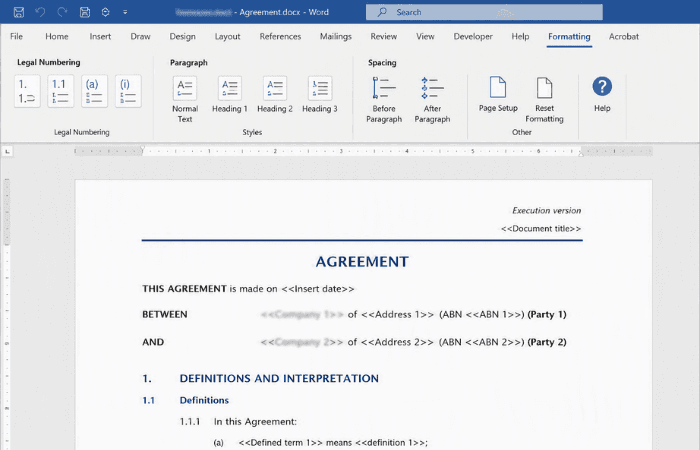
This legal firm had a style guide on paper, but in practice staff were editing documents to suit their own preferences rather than following it, leaving formatting inconsistent from one file to the next. We built a full suite of documents based on the firm's style guide, then added our custom Formatting tab so staff could access the built-in legal numbering lists easily, without the formatting being easy to change.
The challenge
This legal firm had a style guide setting out exactly how its documents should look, but in day-to-day use that guide wasn't being followed. Individual staff members were editing documents to match their own preferences on any given day, rather than sticking to the formatting the firm had already decided on.
That meant no two documents necessarily looked alike, even when they were meant to be built from the same template. Fonts, spacing and numbering could all drift depending on who had last worked on a file, undermining the consistency the style guide was supposed to guarantee.
The firm needed a suite of documents that were genuinely easier for staff to work with day to day, while also being as difficult as possible to change the underlying formatting of, so consistency didn't depend on everyone remembering and following the style guide by hand.
Our approach
We built a full suite of documents formatted correctly according to the firm's existing style guide, giving every document type a consistent, on-brand foundation to work from rather than leaving formatting to individual interpretation.
We built the firm's legal numbering lists directly into the templates, so the correct numbering structure was already in place whenever a document was created, rather than something staff had to set up or fix manually.
The client purchased our custom Formatting tab, giving staff quick, one-click access to the legal numbering lists we'd built into the templates, so using the correct structure was easier than working around it.
Alongside making the templates easier to use, we locked down the formatting controls available to staff, making it as difficult as possible to override fonts, spacing and other style elements the firm needed kept consistent.
The outcome
The firm now has a full suite of documents that are properly formatted according to its own style guide, rather than depending on individual staff members applying that guide correctly, or at all, each time.
With the custom Formatting tab in place, staff can access and apply the firm's legal numbering lists in a click, making it easier to work with the templates the right way than to work around them.
Because the formatting controls themselves are locked down, documents are far less likely to drift away from the style guide over time, giving the firm the day-to-day consistency it was after without needing to police it manually.
Copyright © 2024. Brayalei Pty Ltd T/As Office Experts Group. ABN 32 093 067 737. ACN 093 067 737. All Rights Reserved.
 consult@officeexperts.com.au
 1300 102 810