Your Microsoft Technology Development and Consulting Experts - Operating since 2000

Australia WideSydney, NSWMelbourne, VicBrisbane, QldPerth, WAAdelaide, SACanberra, ACTNorthern Rivers, NSWWollongong, NSWRichmond, VicDarwin, NT
Your Microsoft Technology Development and Consulting Experts - Operating since 2000


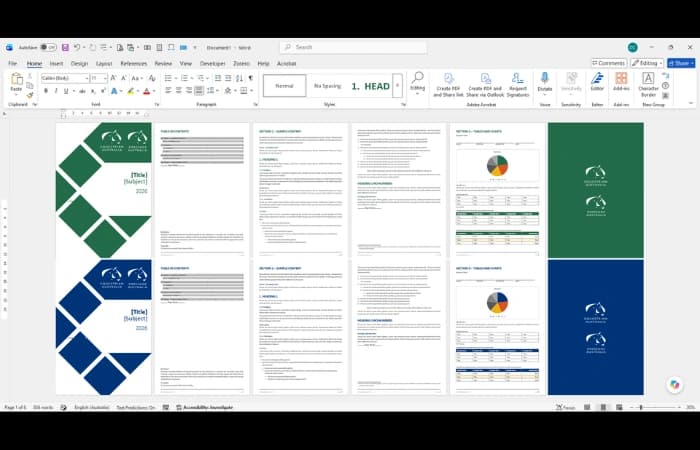
A national sporting organisation runs several disciplines under one parent brand, each with its own colours and visual identity. Staff were applying discipline branding to documents by hand, leading to inconsistent results and templates that were hard to maintain. We built a single Word Master Template with a custom branding system that lets users switch discipline themes, automatically updating covers, styles, numbering, tables and colours throughout the document.
The challenge
This national sporting organisation oversees a number of individual disciplines, all operating under a single parent brand. Each discipline has its own brand identity, with a distinct colour palette and visual style that needed to be respected in every document it produced.
Staff were applying these discipline brands to documents manually, adjusting colours, covers and styles by hand each time. The results varied from one document to the next, and the organisation's overall identity was hard to keep consistent across the different disciplines.
Maintaining a separate template for every discipline wasn't a practical answer either. Each brand change would need to be repeated across multiple files, and staff would have to know which template to pick for which piece of work.
On top of this, Word's standard colour theme only holds a small set of colours, well short of the range the organisation used across all of its disciplines. Staff had no easy way to reach the approved colours for a given brand from within Word itself.
Our approach
We designed a single Word Master Template that holds one consistent document structure and design language for the whole organisation, with each discipline's visual identity layered on top, rather than a separate template built and maintained for each discipline.
We built a custom branding system into the template that lets users select a discipline and switch the whole document to that discipline's theme, so staff never have to apply brand colours or styles by hand.
When a discipline is selected, the template automatically updates the key branded elements throughout the document, including cover pages, back covers, heading styles, multilevel numbering, bullet styles, table styles, and the colour theme and document accents.
Word's standard colour theme couldn't hold the full range of colours the organisation used, so we extended it by building more than 30 additional brand colours directly into the template, grouped and organised by discipline so staff can find the approved options quickly.
The outcome
Staff now have a simple, reliable way to create professional documents in any discipline's brand from one template, with the correct covers, styles, numbering, tables and colours applied automatically when they select a discipline.
With no need to maintain multiple templates or adjust branding by hand, document consistency has improved across the organisation, the time spent creating and updating branded content has dropped, and the risk of the wrong brand being applied to a document has been significantly reduced.
Because every discipline brand is managed centrally from one template, maintenance and governance are far simpler, and the organisation has a scalable foundation that keeps both its parent brand and each discipline's identity intact within a single Word environment.
Copyright © 2024. Brayalei Pty Ltd T/As Office Experts Group. ABN 32 093 067 737. ACN 093 067 737. All Rights Reserved.
 consult@officeexperts.com.au
 1300 102 810