Your Microsoft Technology Development and Consulting Experts - Operating since 2000

Australia WideSydney, NSWMelbourne, VicBrisbane, QldPerth, WAAdelaide, SACanberra, ACTNorthern Rivers, NSWWollongong, NSWRichmond, VicDarwin, NT
Your Microsoft Technology Development and Consulting Experts - Operating since 2000


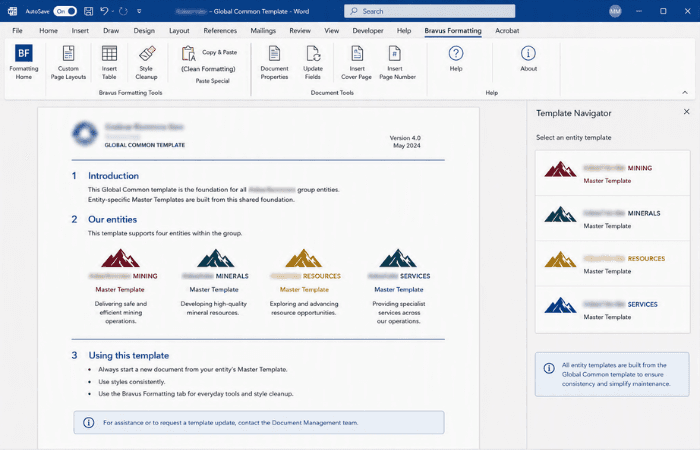
This corporate group needed consistent, professional templates across four related entities, without duplicating the work of building and maintaining branding for each one separately. We built custom Master Templates for each entity from a single shared Global Common template, and added a custom Formatting tab with a copy/paste macro that strips out foreign formatting and applies approved styling automatically.
The challenge
This corporate group operates across four related entities, each needing its own professionally branded document templates. Building and maintaining that branding separately for each entity risked drift between them, inconsistent styling, and considerable duplicated effort every time something needed updating.
Beyond the templates themselves, staff regularly copied content in from other sources, bringing foreign formatting with it that could quietly break the approved styling the templates were built around, the kind of everyday problem that erodes brand consistency one document at a time.
The group needed a way to give every entity its own properly branded Master Template, without four independent builds and four separate maintenance burdens going forward.
Our approach
We built a single Global Common template holding the styles, structures and functionality shared across all four entities, so common elements only ever need to be built and maintained once, rather than four times over.
From the Global Common base, we built a custom Master Template for each of the four entities, reflecting each one's specific branding while staying built on the same consistent foundation underneath.
We designed a custom Formatting tab packed with practical, everyday tools, including a Custom Page Layouts button, an Insert Table button and a Style Cleanup function, giving staff quick access to the functions they use regularly without leaving Word.
The tab's most valuable feature is a copy/paste macro that automatically strips out foreign formatting from pasted content and applies the group's approved styling in its place, so brand consistency is enforced at the point content is added rather than fixed after the fact.
The outcome
All four entities now have their own custom Master Template, built from a single shared Global Common template rather than four independent builds, keeping maintenance centralised even as each entity's branding stays distinct.
The custom Formatting tab gives staff practical tools they use every day, from custom page layouts to table insertion and style cleanup, without needing to leave Word or work around the templates to get their job done.
The copy/paste macro means foreign formatting brought in from other sources no longer quietly breaks the approved styling, with Bravus-approved formatting applied automatically the moment content is pasted in, keeping documents consistent across all four entities with far less manual correction.
Copyright © 2024. Brayalei Pty Ltd T/As Office Experts Group. ABN 32 093 067 737. ACN 093 067 737. All Rights Reserved.
 consult@officeexperts.com.au
 1300 102 810