Your Microsoft Technology Development and Consulting Experts - Operating since 2000

Australia WideSydney, NSWMelbourne, VicBrisbane, QldPerth, WAAdelaide, SACanberra, ACTNorthern Rivers, NSWWollongong, NSWRichmond, VicDarwin, NT
Your Microsoft Technology Development and Consulting Experts - Operating since 2000


A manufacturing client's project setup relied on staff manually creating folders across multiple SharePoint sites, renaming them to match convention, and copying in templates by hand every time a new job was won. We built a Power Automate flow that reads the project details straight from the notification email and does the entire setup automatically.
The challenge
Every time this manufacturing client won a new project, someone in the admin team had to manually build the job folder structure from scratch. That meant logging into three separate SharePoint sites, creating a folder for the new job in each one, renaming everything to match the company's naming convention, and then copying in a set of standard templates the project team would need on day one.
None of it was difficult work, but it was slow, repetitive, and entirely dependent on whoever was doing it that day remembering every step correctly. A missed folder, a naming typo, or a template placed in the wrong site caused confusion further down the track, usually discovered by the project team rather than the person who set it up.
With the business regularly winning multiple new projects a week, the admin overhead was adding up, and the inconsistency was becoming a real risk to how projects were tracked and reported on.
Our approach
We started by sitting with the admin team to walk through exactly what happened from the moment a new project notification email landed, through to a fully set up job folder ready for the project team. This gave us a precise map of every SharePoint site touched, every naming rule applied, and every template that needed to be in place.
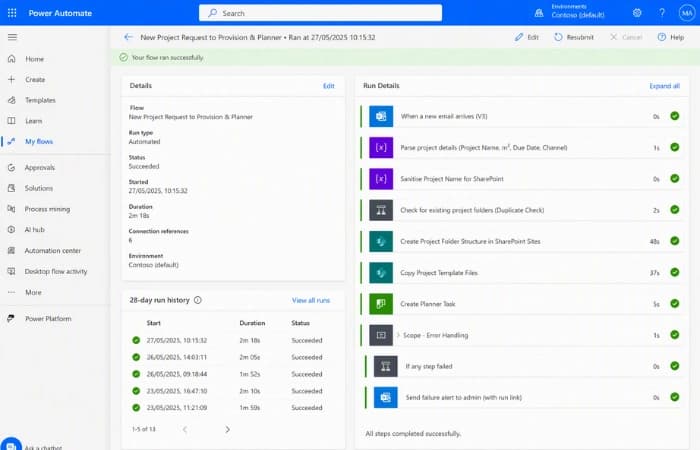
We built a Power Automate flow triggered directly off the project notification email. The flow parses the project number, client name, and job type straight out of the email body, then uses that information to create and correctly name the folder structure across all three SharePoint sites in one pass.
Once folders are created, the flow copies in the correct set of starter templates based on job type, so the project team has everything they need immediately. We also built in error handling so that if any step fails, such as a site being unreachable, the flow stops cleanly and notifies an admin with the specific failure, rather than leaving a half-built folder structure behind.
Before rollout, we tested the flow against a range of real historical project emails, including edge cases like unusual job types and projects with slightly different naming patterns, to make sure the automation held up outside of the tidy example used to build it.
The outcome
What used to take roughly 30 minutes of manual folder building, renaming, and template copying now happens automatically in under a minute, from the moment the project notification email arrives.
Naming convention errors across the SharePoint sites have been eliminated, since the structure is now generated the same way every time. The admin team no longer needs to remember every step or double-check their own work against the convention document.
The built-in error handling means the admin team is notified immediately if something goes wrong, rather than a project team discovering a missing folder days later. Adding support for a new job type going forward is a small configuration change to the flow, not a rebuild.
“We used to lose the best part of an afternoon a week just setting up new job folders properly. Now it happens before anyone's even finished reading the notification email.”
Operations Manager, Commercial Manufacturing Company
Copyright © 2024. Brayalei Pty Ltd T/As Office Experts Group. ABN 32 093 067 737. ACN 093 067 737. All Rights Reserved.
 consult@officeexperts.com.au
 1300 102 810