Your Microsoft Technology Development and Consulting Experts - Operating since 2000

Location
Australia WideSydney, NSWMelbourne, VicBrisbane, QldPerth, WAAdelaide, SACanberra, ACTNorthern Rivers, NSWWollongong, NSWRichmond, VicDarwin, NT
emailconsult@officeexperts.com.au
Phone1300 102 810
Office experts logo
Contact Us
Migrating birds in a flockMigrating birds in a flock

Google Docs to Microsoft Word Migration

Looking for more features?

Migrate to Word to future-proof your business

Is your organisation experiencing the limitations of Google Docs? While Google’s collaborative platform works well for basic document creation, many enterprises, government agencies and professional services firms quickly discover that it lacks the advanced formatting, customisation and scalability essential for complex business operations.

Word Experts specialises in comprehensive Google Docs to Word migration services, helping organisations unlock the full potential of Microsoft Word’s enterprise capabilities. Our expert team handles everything from document format conversion to custom template development, ensuring your transition is smooth, secure and tailored to your specific business requirements.

Migration is more than moving files. A document that looks right in Google Docs can fall apart when it is simply opened in Word: styles collapse, numbering restarts and tables shift. We rebuild the structure underneath through professional template conversion, so your content arrives clean and your brand rules arrive with it.

Signs it’s time to move

  • Long documents slow down

    Reports, tenders and policy manuals past 100 pages become sluggish to open, scroll and edit.

  • Brand rules keep slipping

    Without locked styles and templates, every author formats headings, fonts and numbering their own way.

  • Layouts outgrow the page

    Landscape sections, columns, complex tables and precise image placement are awkward or out of reach.

  • Compliance needs more control

    Regulated teams need document protection, audit trails and approval paths that go beyond what Google Docs offers.

Why Word

Why organisations choose Word over Google Docs

Microsoft Word remains the enterprise standard for professional document creation, offering advanced capabilities that Google Docs simply cannot match. Here is what that looks like in practice.

Document control

Advanced document control

Microsoft Word provides sophisticated layout controls, master document capabilities and professional publishing features that maintain document integrity across large, complex files. Margins, columns, headers and numbering are driven by styles and sections instead of manual fixes, so page 300 behaves exactly like page 3.

Section control
Different headers, footers, orientations and page numbering within a single file.
Style-driven layout
Change a style once and every heading, caption and table updates throughout the document.
Live cross-references
Tables of contents, figure captions and references that refresh with one click.
Customisation

Enterprise customisation

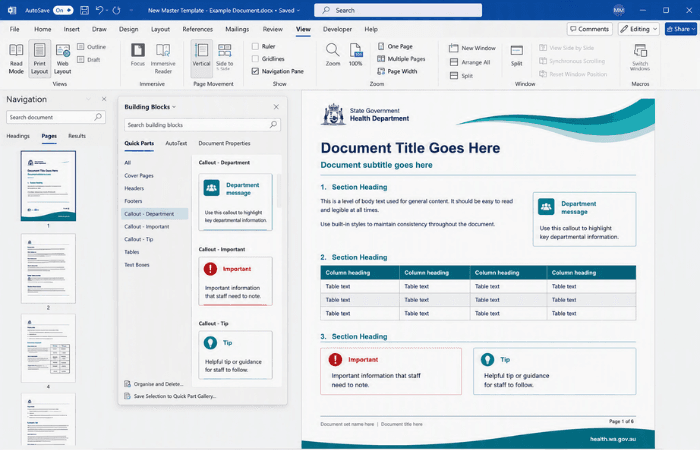
Our programmers create custom ribbons and toolbars and custom automated templates that streamline your team’s workflow, from legal document automation to government compliance templates.

Custom ribbon tabs
One-click buttons for your approved styles, clauses and processes.
Automated templates
Fields, content controls and Quick Parts fill in repeat content for you.
Document automation
Generate contracts and reports from your data, or connect through Word API integrations.

Scalability

Scalability for large documents

While Google Docs struggles with documents over 100 pages and shows performance issues with multiple simultaneous users, Microsoft Word handles enterprise-scale documents with ease. The desktop application does the heavy lifting, so long documents stay responsive.

Long-form ready
Tables of contents, indexes and tables of authorities across hundreds of pages.
Reliable co-authoring
Several authors at once, with tracked changes, comments and version history.
Desktop-grade speed
Full performance in the desktop app, without relying on browser memory.

Security and compliance

Security and compliance

For government departments and regulated industries, Word provides advanced security features, detailed audit trails and compliance tools that meet the strictest requirements, with the controls applied inside the document itself.

Sensitivity labels
Microsoft Purview labels and protective markings applied directly in the document.
Document protection
Restrict editing to forms, comments or tracked changes, with password or permission-based control.
Audit and retention
Version history and tracked changes, backed by SharePoint retention policies, give you a defensible record.

By choosing Microsoft Word with our custom enterprise solutions, organisations gain the document control, security and scalability needed for professional operations, while keeping the flexibility to customise workflows for their specific industry requirements.

Formatting and design

Advanced formatting and design capabilities that Google Docs can’t match

When your organisation needs professional-grade documents, Google Docs’ basic formatting tools quickly become a bottleneck. Microsoft Word’s advanced design capabilities enable you to create sophisticated documents that meet enterprise standards and professional publishing requirements.

Complex document layouts

Create multi-section documents with varying headers, footers and page orientations within a single file. Section breaks allow seamless transitions from portrait to landscape, so a wide financial table can sit inside a portrait report without breaking the page numbering or the header.

  • Section breaks
  • Mixed orientation
  • Linked headers and footers

Professional typography and styling control

Access advanced character spacing, ligature controls, OpenType features and precise baseline adjustments. Word’s comprehensive style management, paired with a proper brand template, keeps your corporate look consistent across entire document libraries.

  • OpenType features
  • Ligatures
  • Style sets

Precision image and object positioning

Word’s object positioning tools give you exact control over images, shapes and text boxes. Use sophisticated text wrapping and anchor objects to specific page elements, so layouts hold their shape when the content changes.

  • Anchored objects
  • Text wrapping
  • Alignment guides

Master document management for large publications

Manage large documents as collections of subdocuments, so several team members can work on different sections at once while formatting, numbering and cross-references stay consistent across the whole publication.

  • Subdocuments
  • Shared styles
  • Unified numbering

Advanced table design and data visualisation

Build complex tables with merged cells, custom borders, shading patterns and nested tables. Repeating header rows across page breaks and sophisticated table styles are essential for financial documents and technical specifications.

  • Merged cells
  • Repeating headers
  • Nested tables

Publishing-grade output control

Advanced print settings, PDF export options with accessibility features and precise page layout controls help ensure documents keep their intended appearance across different printers and viewing devices. We also build accessible Word documents and handle Word to PDF conversion to your exact specification.

  • Tagged PDF export
  • Print-ready settings
  • Accessibility checks

What we deliver

Our complete migration solution

Whether you’re a law firm needing advanced redlining capabilities, a healthcare organisation requiring privacy-conscious templates, or a government agency demanding classified document handling, Word Experts delivers migration solutions that transform how your team creates, collaborates and manages documents.

With 100% formatting preservation

Document format conversion

We convert your Google Docs and Drive folders into properly built Word documents. Headings become real styles, lists become true multilevel numbering, and images, tables, comments and suggestions come across intact, so nothing needs reworking after the move. Large libraries are handled through our template conversion service.

IncludesStyle and heading mapping, rebuilt numbering, comments and suggestions carried across, bulk conversion of whole libraries.

OutcomeDocuments that open, edit and print exactly as intended.

Tailored to your brand and workflows

Custom template development

Master templates built on real styles, Quick Parts and content controls, so every new document starts on brand. See our brand template service.

IncludesLocked brand styles, building blocks, fill-in forms, global templates deployed to every desktop.

OutcomeEvery author starts from the same compliant page.

To ensure smooth adoption

User training and change management

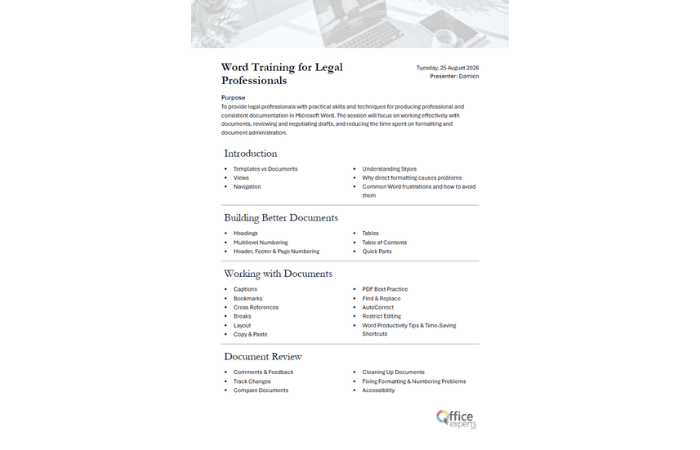
People move faster when they see how their own documents behave in Word. Our Word trainers work with your real files, not generic examples, and teach the shortcuts and habits that make the change stick.

IncludesLive and recorded sessions, quick reference guides, super-user coaching, post-migration check-ins.

OutcomeA team confident in Word from the first week.

With 24/7 enterprise assistance

Ongoing support

Once your team is live, we stay on hand. A template tweak, a new ribbon button or a document that misbehaves the night before a deadline: our programmers across Australia look after it.

IncludesTemplate and ribbon updates, rapid-response fixes, version upgrades, documentation handed to your team.

OutcomeHelp when you need it, not after a queue.

Connected to your business ecosystem

Integration services

Pull data from your CRM, finance or case management system straight into Word, and send finished documents to SharePoint, Teams or your records system. Explore mail merge, API integrations and Copilot-ready templates.

IncludesData-driven documents, SharePoint and Teams, line-of-business APIs, AI-assisted drafting.

OutcomeDocuments that fill themselves from the systems you already use.

  • Law firms

    Advanced redlining

    Tracked changes, comparison and clause libraries that Google Docs suggestions can’t match.

  • Healthcare

    Privacy-conscious templates

    Controlled templates and document protection for organisations handling sensitive patient and client records.

  • Government

    Protected document handling

    Sensitivity labels and protective markings for government agencies handling classified material.

How a migration runs

From Google Docs to Word, without the disruption

Every migration is tailored, but the path is the same: understand what you have, rebuild it properly, prove it with a pilot group, then roll it out with support behind your team.

  1. Audit your documents

    We review your Google Docs library: what is in use, what is duplicated, and which documents should become templates rather than simply convert. Nothing is touched until you have signed off the plan.

    You receiveA migration plan with priorities

  2. Convert and rebuild

    Documents are converted in batches and the structure underneath is rebuilt: styles, numbering, tables, headers and footers. Your brand is built into a master template set at the same time.

    You receiveClean documents and master templates

  3. Train and pilot

    A pilot group works with the new templates on real files while we train them and refine the setup from their feedback, so surprises are found before roll-out.

    You receiveSigned-off templates and trained champions

  4. Go live and support

    We deploy the templates and any custom ribbons across the organisation, hand over documentation and stay on call. Need to move other tools too? See our upgrades and migration services.

    You receiveA smooth cut-over and ongoing help

Case Studies

Examples of some template and document projects we've delivered

2500+ Happy Clients

Read all case studies

Ready to transform your document workflow?

Don’t let Google Docs’ limitations hold your organisation back from creating truly professional, scalable documents. Every day you delay migration is another day your team struggles with formatting restrictions, performance issues and basic features that can’t match your enterprise requirements.

Our clients typically see immediate improvements in document quality, significant time savings through automated templates and custom workflows, and enhanced collaboration capabilities that scale with their growing needs.

Start with a conversation. We will look at a handful of your real documents, tell you plainly what will convert cleanly and what should be rebuilt, and map out a migration that suits your team.

Contact Us

Get in touch with our team for general enquiries and support. We're here to help with any questions you might have about our services.

Need to attach a file?

Need pricing for a specific project? Fill out our quote form and we'll provide you with a detailed estimate tailored to your needs.