Your Microsoft Technology Development and Consulting Experts - Operating since 2000

Australia WideSydney, NSWMelbourne, VicBrisbane, QldPerth, WAAdelaide, SACanberra, ACTNorthern Rivers, NSWWollongong, NSWRichmond, VicDarwin, NT
Your Microsoft Technology Development and Consulting Experts - Operating since 2000


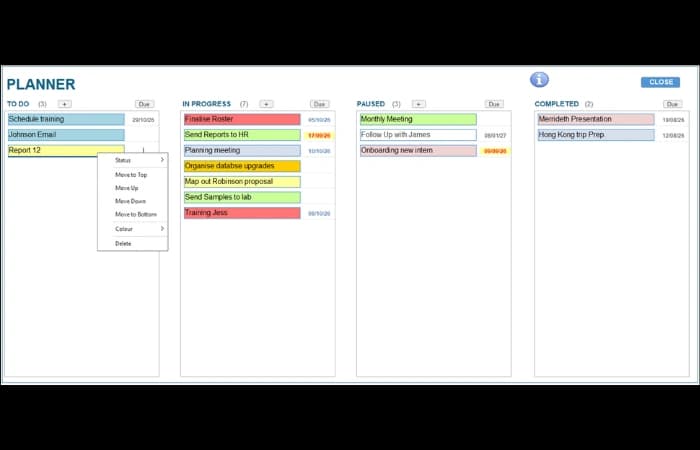
A national research organisation was using Microsoft Planner for its tasks and asked whether something similar could be built inside its existing Access database, in a Kanban format. We built a Kanban planner form in Access with four status columns, drag and drop task management, due date highlighting and a details form for each task, so the planner no longer sits outside the database.
The challenge
The client was using Microsoft Planner to manage its tasks. That meant running a second planner outside its existing Access database.
The client asked whether we could build something similar inside the Access database, using a Kanban format, so tasks could be organised in columns by status.
Keeping the planner in house also opened up the possibility of linking tasks to data held in the database.
Our approach
We built a main form in Access with four status columns, where tasks can be added, scheduled, edited and deleted.
A separate details form lets users edit a task's details, notes, due dates and more. Double clicking a task on the board opens it to view or edit.
Tasks can be dragged to a new sort position, or dragged into a different status column.
A right-click menu lets users delete a task, or change its status, position or colour.
Due dates are highlighted on the board.
The outcome
The client now has a Kanban planner inside its existing Access database, which resolves the issue of having a second, outside planner.
Users can add, schedule, edit and delete tasks from the main board, move tasks between status columns by drag and drop, and see due dates highlighted.
This is the first iteration. Possible next steps include assigning tasks to particular projects or users, and alerts on start up for pending tasks. Because the planner now lives in Access, it could also potentially be linked to data held in the database.
Copyright © 2024. Brayalei Pty Ltd T/As Office Experts Group. ABN 32 093 067 737. ACN 093 067 737. All Rights Reserved.
 consult@officeexperts.com.au
 1300 102 810