 consult@officeexperts.com.au
 1300 102 810
Excel dashboards
An Excel dashboard that extracts data automatically from SQL Server and sets up your pivot charts and tables for a periodic report.
Your Microsoft Technology Development and Consulting Experts - Operating since 2000





Moving your Access data to a Microsoft SQL Server backend lets you keep your existing forms, reports and interface intact. You retain the simplicity and flexibility of Access on the front end, while SQL Server provides the power, speed and security of an enterprise-grade database engine.
We also connect Excel, Word, PowerPoint and Visual Studio to your SQL Server data, so reports, documents and presentations build themselves. Since 2000, Office Experts Group has helped hundreds of Australian organisations upgrade their Access databases to SQL Server without disrupting daily operations.
Access stays as the front end your team already knows. SQL Server does the heavy lifting behind it, delivering faster performance, stronger data protection and improved reliability.
Keep your data secure and centralised, with access controlled at the server rather than in a file anyone can copy.
SQL Server removes the database corruption and crashes that plague Access. Your data stays secure, accurate and accessible, even during unexpected power loss or network failures.
Handle more data, more users and more work without the slowdowns that come with a shared Access file.
SQL Server Management Studio (SSMS) gives you centralised control of every database operation from one interface, turning administration from a chore into a streamlined process.
If someone copies an Access file from your network, they can walk away with your data. With SQL Server, only authorised users can query or update information, and all access is controlled at the server level.
The global average cost of a data breach is now US$4.99 million, a 12% increase on the year before and a record high.
Access is still an excellent front end for forms, reports and day-to-day work. The limits show up in the data layer. Here is what changes when your tables move to SQL Server.
| Access only (file back end) | Access with a SQL Server backend | |
|---|---|---|
| Concurrent users | Begins to slow, or risks corruption, beyond 10 to 20 users | Tens or even hundreds of users working at once |
| Database size | 2GB limit per Access database file | From a few megabytes to multiple terabytes |
| How queries run | Data is pulled across the network to each user's PC | Queries run on the server and only the results are sent to Access |
| Security | Anyone who can copy the file can open the data | Windows authentication, role-based access and encrypted connections |
| Reliability | Prone to corruption after crashes, power loss or network failures | Transaction-safe, with automatic backups and recovery tools |
| Remote and cloud access | Difficult outside your own network | Deployed in-house or on Microsoft Azure for secure remote access |
| Your forms and reports | Stay as they are | Stay as they are, linked to the SQL Server tables |
Because Access remains the front end, your team keeps the forms and reports they already use. If your database is already struggling, our Access specialists can review it and tell you whether SQL Server is the right fix, or whether a cleanup is all you need.
Not sure Access is still the right tool? Find out if Access is right for your company.
We set up custom solutions in Access, Excel, Word and Visual Studio that modify and extract data from SQL Server databases. For example:
An Excel dashboard that extracts data automatically from SQL Server and sets up your pivot charts and tables for a periodic report.
Automatically generate Word documents for your customers using the data in your existing SQL Server databases.
Automatically generate a monthly PowerPoint presentation from your SQL Server data, with no copying and pasting.
A database interface in Visual Studio or Microsoft Access that lets your team interact with your SQL Server data.
Extend the functionality of an existing application that already uses SQL Server as its back-end database.
Put a Power Apps front end or a Power Automate workflow on the same SQL Server data, for access from a browser or phone.
We look at your Access database, its size, how many people use it and any performance or corruption problems, then agree the scope with you.
We move your tables to SQL Server, on your own server or Azure SQL, with data conversion and testing along the way.
Your existing Access forms and reports are relinked to the SQL Server tables and the whole system is tested before your team switches over.
We set up authentication, roles, encryption, backups and maintenance jobs, and tune queries for your busiest forms and reports.
We document the setup, train your staff and stay on hand for ongoing maintenance and support.
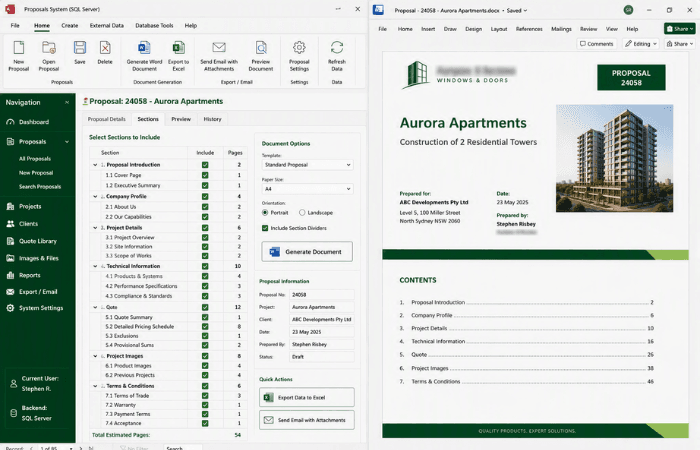
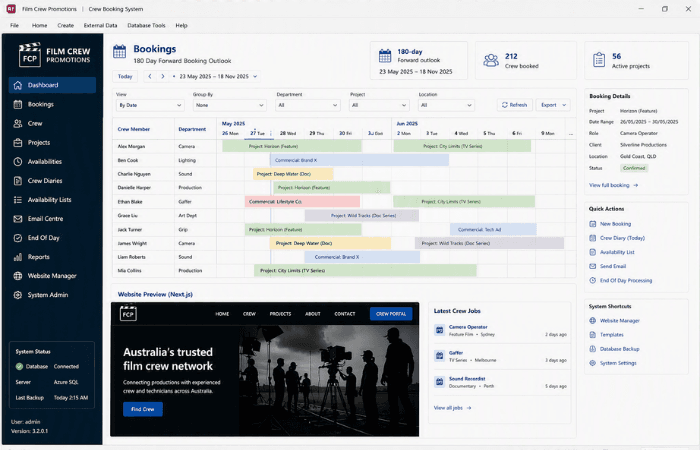
No. Your Access file stays as the front end, with its forms, reports and interface intact, and its tables are linked to the SQL Server database through ODBC. Your team keeps working in the screens they already know.
An Access database typically begins to slow, or risks corruption, once 10 to 20 people use it at the same time. With a SQL Server backend, tens or even hundreds of users can work concurrently, because queries run on the server and only the results are sent to each user.
Yes. A single Access database file is limited to 2GB. SQL Server handles databases from a few megabytes to multiple terabytes, so your data can keep growing without workarounds.
Yes. We build Excel dashboards that refresh from SQL Server with pivot charts and tables, Word documents generated for your customers from database records, and PowerPoint presentations produced automatically each month from your live data.
Yes. SQL Server can be hosted in-house or on Microsoft Azure. Azure gives you secure remote access and makes it easier for people in different locations to work on the same data.
It depends on the size and complexity of your database, so we start with a review and give you a clear scope. Migrations are planned to avoid disrupting daily operations, and the system is tested before your team switches over.
Copyright © 2024. Brayalei Pty Ltd T/As Office Experts Group. ABN 32 093 067 737. ACN 093 067 737. All Rights Reserved.