Your Microsoft Technology Development and Consulting Experts - Operating since 2000

Australia WideSydney, NSWMelbourne, VicBrisbane, QldPerth, WAAdelaide, SACanberra, ACTNorthern Rivers, NSWWollongong, NSWRichmond, VicDarwin, NT
Your Microsoft Technology Development and Consulting Experts - Operating since 2000


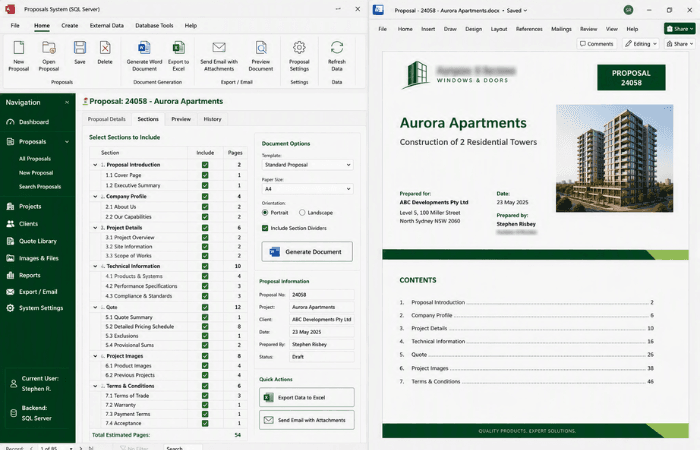
Windowline installs windows across commercial and residential properties, many of them high-rise apartment blocks, mainly in Sydney. Every proposal, quote and contract was pieced together manually from paper records and Excel, often running to 50 or more pages. We designed an Access database, later migrated to SQL Server, that lets staff select the sections they need and generates the full Word document automatically, complete with project and client details, quote tables, data and images.
The challenge
The client installs windows and doors across commercial and residential properties, mainly around Sydney, with a large share of the work in high-rise apartment blocks. Every project starts with a proposal, and often ends with a lengthy quote and contract, each one specific to that job.
Before this system existed, all of it was managed manually, recorded on paper or scattered across Excel spreadsheets. Building a single proposal meant pulling together project details, client information and quote data by hand, then formatting it all into a document that regularly ran to 50 pages or more.
With every document assembled from scratch, there was no consistency from one proposal to the next, and no quick way to reuse the sections that stayed the same between jobs. The manual process was slow at exactly the point in the sales cycle where speed mattered most.
Our approach
We designed an Access database to manage proposals for the client's projects, structured around the sections that make up a typical proposal, quote and contract, including project and client information alongside quote and project detail such as tables, data and images.
We built the system so users can select which sections to insert into a given document, letting staff assemble a proposal, quote or contract from the relevant building blocks rather than starting each one from a blank page.
We built the generation engine to produce the finished document directly in Word, pulling in the selected sections, including tables, data and images, and assembling them into a single, consistently formatted document ready to send.
We added options to export data to Excel and to generate emails with attachments directly from the system, so proposals, quotes and contracts could move straight from generation to delivery without extra manual steps.
As the database grew, we migrated the backend from Access to SQL Server, keeping the same section-based generation workflow in place while giving the system a backend able to handle a larger, more concurrent workload.
The outcome
Proposals, quotes and contracts that once took considerable manual effort to compile are now generated directly from the database, with staff selecting the sections they need rather than assembling every document by hand.
Long documents of 50 or more pages, complete with project and client information, quote tables, data and images, are now produced consistently every time, rather than varying with whoever put the document together.
With export to Excel and automated emails with attachments built in, the process now runs from data entry through to delivery in one connected system, in place of paper records and standalone spreadsheets.
Copyright © 2024. Brayalei Pty Ltd T/As Office Experts Group. ABN 32 093 067 737. ACN 093 067 737. All Rights Reserved.
 consult@officeexperts.com.au
 1300 102 810