Your Microsoft Technology Development and Consulting Experts - Operating since 2000

Australia WideSydney, NSWMelbourne, VicBrisbane, QldPerth, WAAdelaide, SACanberra, ACTNorthern Rivers, NSWWollongong, NSWRichmond, VicDarwin, NT
Your Microsoft Technology Development and Consulting Experts - Operating since 2000


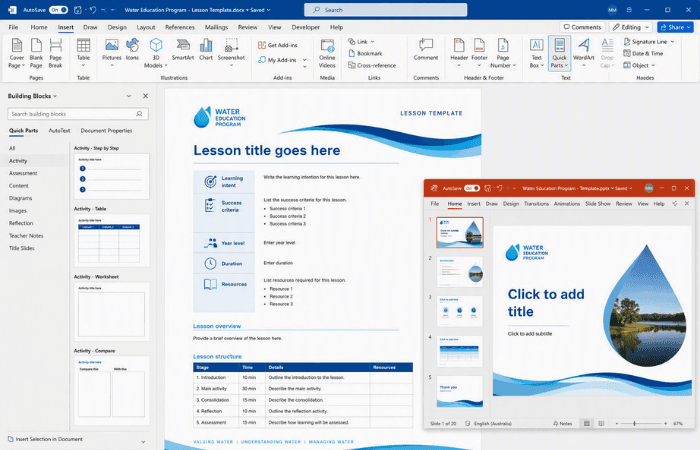
The client's water education program had a lesson template designed in InDesign by their design partner, but curriculum writers across Western Australia needed to build lessons in Word and PowerPoint, not Adobe software. We translated the InDesign design into fully functional Word and PowerPoint templates, building Quick Parts and a Slide Master system so educators could assemble consistent, branded lessons without wrestling with formatting.
The challenge
This water education program's delivery partner had designed a lesson template in InDesign, built to a high visual standard the way Adobe design work typically is. The intent was for that design to become the standard lesson template curriculum writers across Western Australia would use.
The problem was the gap between the two worlds. Curriculum writers worked in Word and PowerPoint, not InDesign, and Adobe-designed layouts tend to be rigid in ways that translate awkwardly into Word, where documents need to flex and reflow as educators add and edit content.
Without a proper translation of the design into native Word and PowerPoint templates, curriculum writers across the Program had no consistent, easy way to produce lessons that matched the intended branding and structure.
Our approach
We started from the InDesign file provided by the client's design partner, identifying every layout that needed to exist as a working Word or PowerPoint template rather than a static, designed page.
We rebuilt the design in Word and spent considerable time testing it with the client, refining the template repeatedly to reduce the rigidity of the original InDesign layout so it could hold up to real curriculum writers editing real content.
To make the Word template genuinely usable day to day, we built Quick Parts for each layout, so educators could insert the pages and structures they needed with a click rather than trying to recreate formatting by hand.
For the PowerPoint component, we took the required layouts from the InDesign design and rebuilt them as a full Slide Master system, with precise placeholders, consistent spacing and locked-down brand elements engineered into each layout.
We structured the masters exactly around how the client's education team wanted to use them, with a clear title hierarchy, flexible content areas, and purpose-built layouts for activities, diagrams and assessment pages, so every lesson could be assembled quickly.
The outcome
Curriculum writers across the Program now have fully functional Word and PowerPoint templates that carry the InDesign design through faithfully, without the rigidity that would have made the original layout impractical to edit.
Quick Parts mean educators can insert the required layouts and structures as needed, rather than fighting with formatting every time they build a lesson.
The Slide Master system, with its locked-down brand elements and purpose-built layouts, lets educators focus on lesson creation rather than formatting, while every lesson produced stays visually consistent across the entire Program.
Copyright © 2024. Brayalei Pty Ltd T/As Office Experts Group. ABN 32 093 067 737. ACN 093 067 737. All Rights Reserved.
 consult@officeexperts.com.au
 1300 102 810