Your Microsoft Technology Development and Consulting Experts - Operating since 2000

Australia WideSydney, NSWMelbourne, VicBrisbane, QldPerth, WAAdelaide, SACanberra, ACTNorthern Rivers, NSWWollongong, NSWRichmond, VicDarwin, NT
Your Microsoft Technology Development and Consulting Experts - Operating since 2000


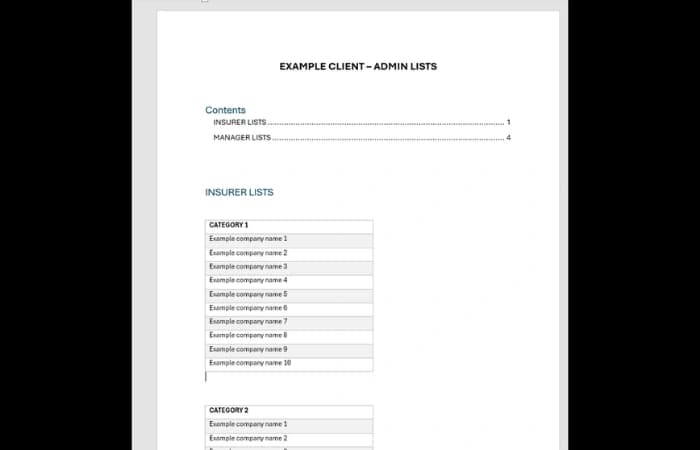
The client's staff created quoting reports in Word from a set of existing templates, but each report meant hunting through the whole document to find and complete a large number of fields, with no way to tell afterwards whether any had been missed. Updating a drop-down list was just as slow for the Administrator, who had to change it by hand in every relevant field of every template. We built a pop-up form that gathers every field in one place, checks that mandatory fields are complete, and populates the report automatically, with a single background list the Administrator maintains for all templates.
The challenge
The client created quoting reports in Word from any of its existing templates. Each report had a large number of fields to update. Some needed a direct entry, such as a date or a free text value, and others needed the user to choose from a drop-down list.
Completing a report was very time consuming. Users had to look through the entire document to find each field they were meant to fill out, and once they had finished there was no way to tell whether any had been missed.
Maintaining the drop-down lists was a problem for the Administrator as well. Every time the list behind a field needed to change, the list in every single relevant field of every template had to be updated manually, which took a lot of work.
Our approach
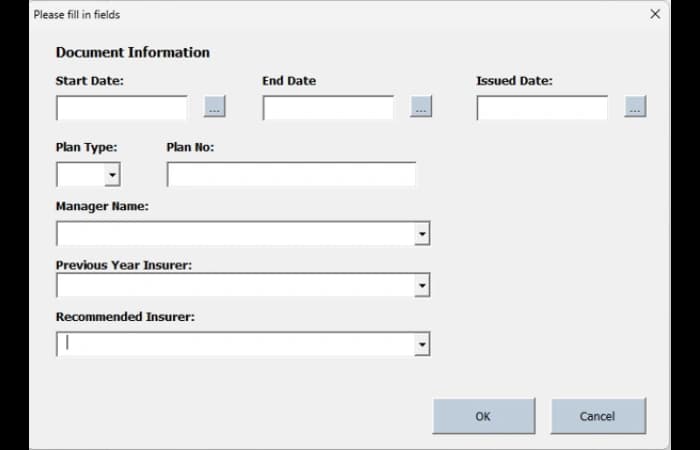
Each time a user creates a new report from a template, a pop-up form appears showing all of the fields that need to be completed. Users work through one form rather than searching the document for each field.
Once the form is complete, the entries are placed automatically into the required locations in the document, provided the user has completed all of the mandatory fields.
If any mandatory fields have been missed, the user is notified and given the opportunity to go back and complete them, so an incomplete report is picked up before it is finished rather than after.
Users can re-open the pop-up form at any time to see all of their current selections in each field, and change their mind and update any of them.
The lists behind every drop-down field are kept in a single background document that only the Administrator can access. The Administrator can add, edit and remove items on any of these lists in that one place.
Once a list has been changed, the update is rolled out to the background of all the templates used by all staff members, replacing the manual job of editing each field in each template.
The outcome
Staff now complete a quoting report through one pop-up form instead of searching the whole document for fields, with the answers placed into the report automatically once the mandatory fields are done.
Missed fields no longer go unnoticed. Users are told what is outstanding and can go back to complete it, and they can re-open the form to review and change their selections whenever they need to.
The Administrator now updates a drop-down list by changing the one background copy only, then rolls the change out to the templates used by all staff, instead of editing every relevant field in every template by hand.
Copyright © 2024. Brayalei Pty Ltd T/As Office Experts Group. ABN 32 093 067 737. ACN 093 067 737. All Rights Reserved.
 consult@officeexperts.com.au
 1300 102 810