Your Microsoft Technology Development and Consulting Experts - Operating since 2000

Australia WideSydney, NSWMelbourne, VicBrisbane, QldPerth, WAAdelaide, SACanberra, ACTNorthern Rivers, NSWWollongong, NSWRichmond, VicDarwin, NT
Your Microsoft Technology Development and Consulting Experts - Operating since 2000


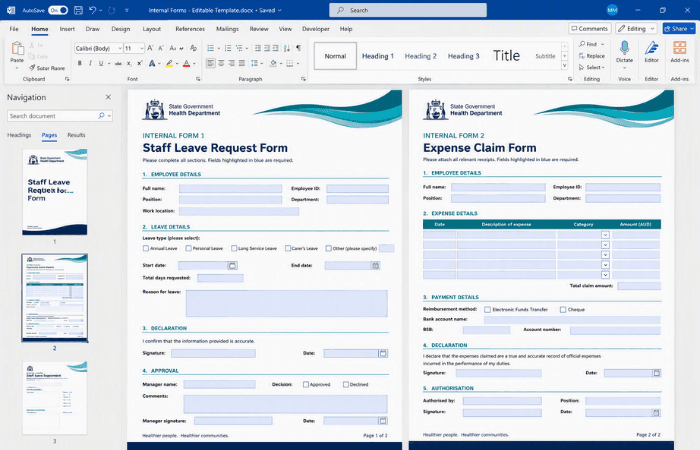
Having recently completed a new master template for this state government health department, we were asked to build two internal staff forms on top of it. We built both forms directly into the existing branded template, converted them into editable PDFs using Adobe Acrobat Pro, and trained the client's team to make minor content changes themselves going forward.
The challenge
Having recently had a new master template built for their organisation, this state government health department needed two internal forms created for their staff to complete as part of day-to-day operations.
The forms needed to sit on the same branded foundation as the rest of the organisation's documents, rather than being built as one-off files that risked drifting from the established template and brand standards.
Staff needed to be able to fill the forms in easily and reliably, without the layout shifting or breaking, which meant a standard Word document wasn't going to be a robust enough format for how the forms would actually be used.
Our approach
We talked through the options with the client and agreed the most reliable approach was to build both forms directly into their existing master template, rather than starting the layouts from scratch.
We built both forms using the existing template created for the client, keeping the layouts consistent with the organisation's established branding and document standards throughout.
Once the layouts were finalised, we saved each form as a PDF and converted it into an editable PDF using Adobe Acrobat Pro, so staff could complete the fields directly without disturbing the underlying design.
We provided training to the client's team on how to make minor content changes to the forms themselves, so small updates down the track don't need to come back to us as a new request.
The outcome
The client now has two internal forms built directly into their existing master template, keeping every document staff use aligned with the same brand standard.
Staff can complete the forms through editable PDF fields, filling them in easily while the underlying layout and branding stay exactly as designed.
With training now complete, the client's own team can make minor content changes to the forms independently, without needing to come back to us for small updates.
Copyright © 2024. Brayalei Pty Ltd T/As Office Experts Group. ABN 32 093 067 737. ACN 093 067 737. All Rights Reserved.
 consult@officeexperts.com.au
 1300 102 810