Your Microsoft Technology Development and Consulting Experts - Operating since 2000

Australia WideSydney, NSWMelbourne, VicBrisbane, QldPerth, WAAdelaide, SACanberra, ACTNorthern Rivers, NSWWollongong, NSWRichmond, VicDarwin, NT
Your Microsoft Technology Development and Consulting Experts - Operating since 2000


A four-location community services provider had each site keying records into its own workbook, with a central file pulling them together through direct workbook links. The structure had grown past 400MB and thousands of columns wide, and every new reporting breakdown meant hours of manual rework. We rebuilt it as a row-based entry template consolidated with Power Query, migrating all existing data into the new structure.
The challenge
This community services provider ran four separate locations, each keying its own client and service records into its own Excel workbook. A central file was meant to bring it all together, but rather than a proper data structure, it did this through direct workbook links, pulling cell references straight out of each location's file.
Every new client, service type, or reporting category added over the years meant another column, not another row. The central file had grown sideways for so long that it was pushing past 360MB and thousands of columns wide, well beyond what Excel, or the staff opening it, could comfortably handle.
Opening the file took minutes. Recalculating it took longer. And because the structure was column-based rather than row-based, any new reporting breakdown, a different date range, a new service category, a different way of slicing the same data, meant hours of manual formula rework rather than a few clicks.
The four location workbooks also had no real safeguards against the links breaking. A renamed file, a moved folder, or a workbook left closed at the wrong moment was enough to silently break the consolidation, and nobody would know until a report came out with a gap in it.
Our approach
We reviewed all four location workbooks alongside the central consolidation file to understand exactly what data was being captured, how the workbook links were structured, and which reports were being built from the output. This gave us a clear picture of what the new structure needed to preserve.
Rather than a sideways-growing structure, we designed a standardised entry template built the way spreadsheet data should be structured, one row per record, with consistent columns across all four locations. This is the structure Power Query and pivot tables are built to work with.
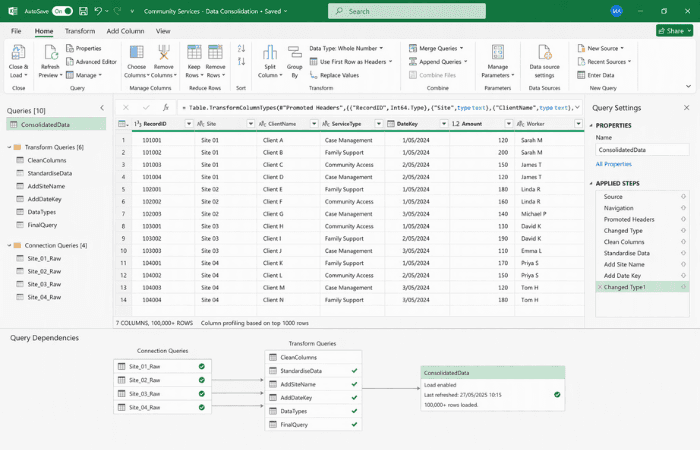
We replaced the direct workbook links with a Power Query connection that pulls from all four location workbooks and consolidates them automatically. Refreshing the data is now a single action rather than a web of cell references that can silently break.
All existing records from the old structure were migrated into the new row-based template, so the provider kept its full reporting history rather than starting again from the day of the rebuild.
We walked the team through building new reporting breakdowns using pivot tables against the consolidated dataset, so future reporting changes are a drag-and-drop exercise for their own staff, not a request back to us.
The outcome
The four location workbooks are now consolidated with a single Power Query refresh, replacing a structure that depended on direct workbook links staying intact across four separate files and four separate teams.
The underlying file has moved from a column structure that grew wider with every new client or category, to a stable row-based dataset that grows the way spreadsheet data is meant to, downward, not sideways. File size and recalculation time are no longer a growing problem.
New reporting breakdowns, a different date range, a new service category, a different site comparison, are now built by dragging fields into a pivot table rather than writing new formulas across thousands of columns. The reporting work that used to need a specialist now sits comfortably within the team's own Excel skills.
“We'd reached the point where opening the master file was something you did with a coffee in hand, because you knew it would take a while. Now it's just a refresh button.”
Finance Lead, Multi-Site Community Services Provider
Copyright © 2024. Brayalei Pty Ltd T/As Office Experts Group. ABN 32 093 067 737. ACN 093 067 737. All Rights Reserved.
 consult@officeexperts.com.au
 1300 102 810