Your Microsoft Technology Development and Consulting Experts - Operating since 2000

Australia WideSydney, NSWMelbourne, VicBrisbane, QldPerth, WAAdelaide, SACanberra, ACTNorthern Rivers, NSWWollongong, NSWRichmond, VicDarwin, NT
Your Microsoft Technology Development and Consulting Experts - Operating since 2000

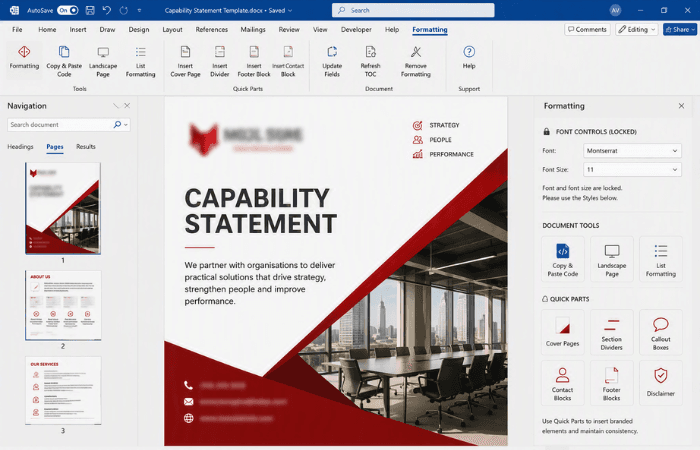
The client was updating its branding, but its Word templates kept breaking, with formatting corruption and staff freely overriding brand elements creating constant manual rework. We rebuilt the entire template suite from a single Master Template, added a custom Formatting tab to lock down font controls, and built a set of branded Quick Parts, so the new brand stays consistent without ongoing fixes.
The challenge
The client was updating its branding and needed its existing suite of Word templates brought into line with the new design. On paper this was a rebranding job, but in practice the templates themselves were the problem.
Formatting corruption was a recurring issue, with documents breaking or drifting out of shape as they were used day to day. Staff were also able to freely change branding elements such as fonts and font sizes, so even a correctly built document could quickly end up looking inconsistent with the brand it was supposed to represent.
Fixing these inconsistencies fell to staff manually, document by document, which ate up a large amount of time that should have gone toward client work rather than reformatting. Red Fox Advisory needed a controlled, reliable solution, one that locked down formatting and enforced the brand standards, rather than a rebrand that would drift out of line again within months.
Our approach
We built a new Master Template in for the client's updated branding, establishing one consistent foundation that every other template in the suite would be built from, rather than each document being styled independently.
From the Master Template, we developed eleven sub-templates, including a CV, letterhead, memo, meeting minutes and capability statement, each reflecting the new brand while remaining practical for staff to use every day.
We added our custom Formatting tab to the templates, locking down font and font-size controls so staff rely on the styles we built into the templates rather than applying manual formatting that could drift away from the brand.
Alongside the locked-down formatting controls, the Formatting tab includes our copy-and-paste code, a landscape page button and a list-formatting tool, giving staff quick access to the functions they use regularly without needing to work around the formatting restrictions.
We built a range of highly designed Quick Parts, including cover pages and template-specific elements, so staff can insert branded components instantly and keep every document consistent without rebuilding elements from scratch.
The outcome
The client now has a full suite of eleven templates built from a single Master Template, giving the organisation one consistent foundation for its new branding rather than a set of documents styled independently.
With font and font-size controls locked down through the custom Formatting tab, staff can no longer freely override branding elements, and the formatting corruption that previously caused constant rework has been designed out of the templates themselves.
The branded Quick Parts mean staff can insert cover pages and other template-specific elements instantly, so maintaining brand consistency is now built into everyday document creation rather than a separate manual task.
Copyright © 2024. Brayalei Pty Ltd T/As Office Experts Group. ABN 32 093 067 737. ACN 093 067 737. All Rights Reserved.
 consult@officeexperts.com.au
 1300 102 810