Your Microsoft Technology Development and Consulting Experts - Operating since 2000

Australia WideSydney, NSWMelbourne, VicBrisbane, QldPerth, WAAdelaide, SACanberra, ACTNorthern Rivers, NSWWollongong, NSWRichmond, VicDarwin, NT
Your Microsoft Technology Development and Consulting Experts - Operating since 2000


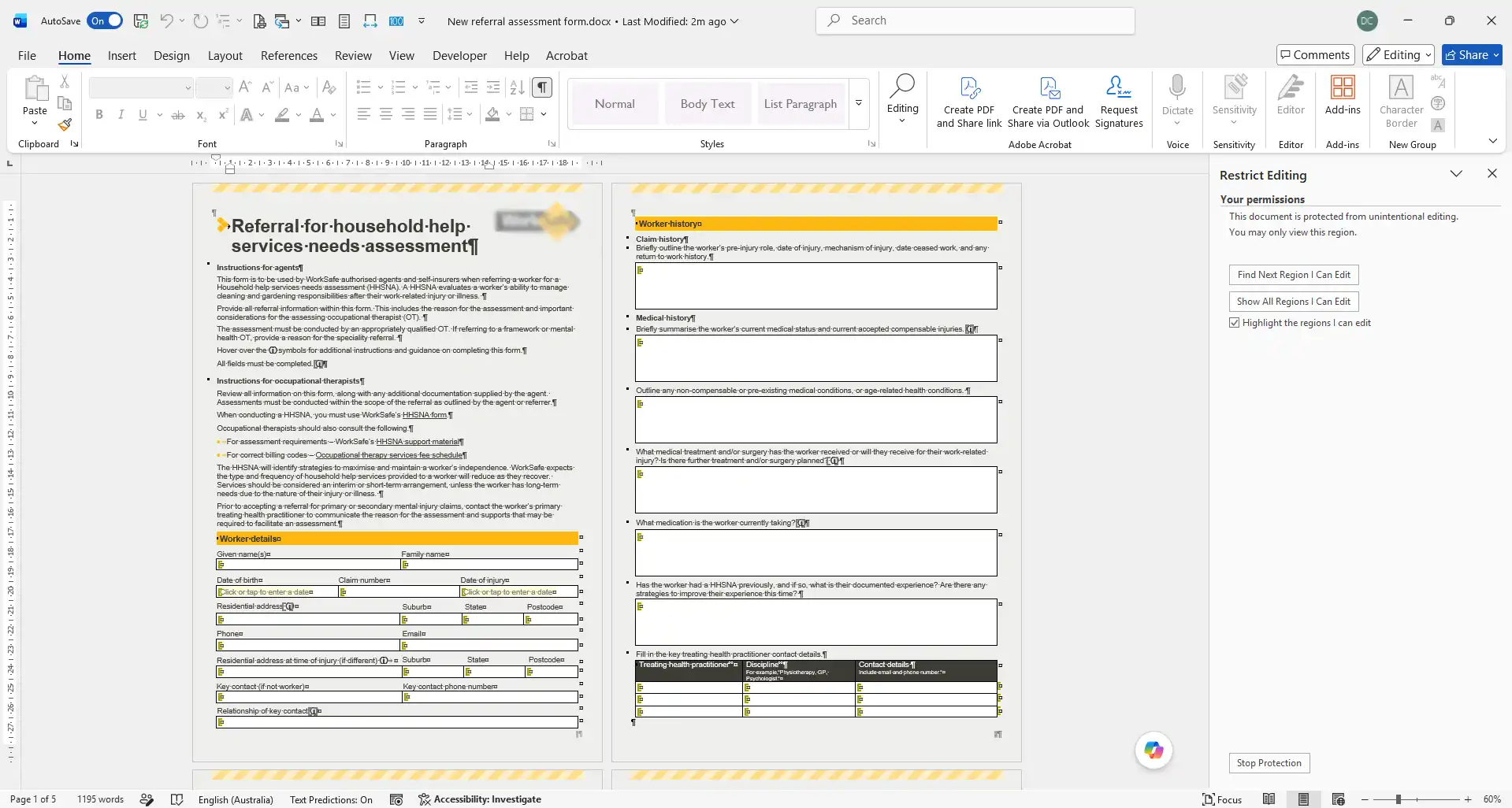
This government workplace safety authority relied on a suite of complex Word forms for assessment, referral and reporting workflows, but inconsistent formatting and disjointed layouts made them difficult to complete, and users could easily alter formatting or delete mandatory content. We rebuilt every form from the ground up using structured styles, advanced content controls and document protection, so staff now complete each one by simply tabbing through guided, locked-down fields.
The challenge
This government workplace safety authority relied on a suite of complex Word forms to support its assessment, referral and reporting workflows, the everyday paperwork behind how cases were reviewed and processed.
Over time, the forms had become inconsistent. Formatting and layouts differed from one document to the next, and completing them was neither intuitive nor quick, creating a difficult and time-consuming experience for the staff who used them daily.
Because the forms were built as ordinary, unprotected Word documents, users could easily alter formatting, delete mandatory content, or otherwise corrupt the layout while filling them in, undermining the consistency and integrity of the data being captured.
Beyond the day-to-day usability problem, the inconsistent design made the forms difficult to maintain and support, and left the authority with no reliable way to guarantee consistent data capture or document governance across the suite, on top of a static structure that didn't reflect how the information actually needed to be entered.
Our approach
We rebuilt every form in the suite from scratch using structured Microsoft Word styles and template design best practices, rather than patching the existing layouts.
We standardised formatting, layout, navigation and branding across the entire document suite, so every form shared the same consistent structure and appearance regardless of which workflow it supported.
We built dropdown lists, text-only entry fields, checkboxes and image placeholders directly into the forms, replacing free-text areas that were prone to inconsistent or incorrect entries.
We added dynamic tables combining expandable and static fields, so the forms could properly support the varying amount of information each case genuinely required, rather than forcing data into a fixed, static layout.
We applied document protection and editing restrictions across every form, preventing accidental changes to layout, formatting or mandatory content, so the structure the authority had designed stayed exactly as built no matter who completed it.
With content controls and protection in place, staff can now complete each form simply by tabbing through the required fields in order, creating an intuitive, guided data-entry experience across the whole suite.
The outcome
The authority now has a full suite of functional, intuitive Word forms that behave consistently no matter who is completing them, replacing documents that had drifted out of shape over time.
With content controls and document protection built in, the risk of accidental modification or corruption has been virtually eliminated, and document integrity is maintained throughout the completion process.
Data capture is now more consistent and accurate, administrative effort and support requirements have reduced, and staff have adopted the new forms more readily thanks to the guided, tab-through experience built into every one.
Copyright © 2024. Brayalei Pty Ltd T/As Office Experts Group. ABN 32 093 067 737. ACN 093 067 737. All Rights Reserved.
 consult@officeexperts.com.au
 1300 102 810